EN
EN DE
DE ES
ES FR
FR NL
NL PT
PT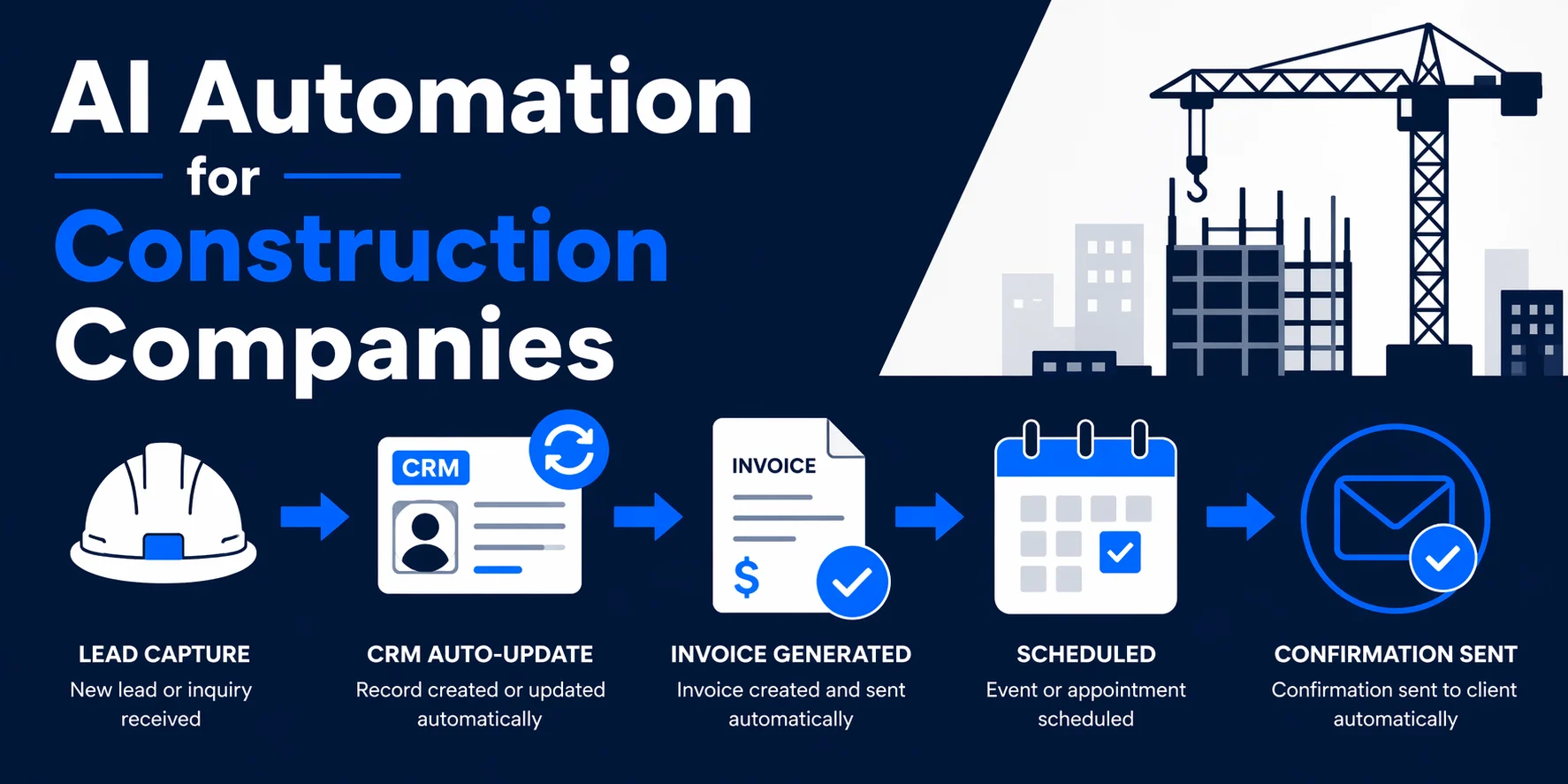
Quick Answer: AI automation for construction companies handles CRM record updates, job scheduling confirmations, invoice generation, and client follow-up by building workflows inside the tools you already use. No new software required. The most common result: 5 to 10 hours recovered per week on admin, with inbound leads getting a response within minutes instead of hours.
Running a construction business means managing people, materials, timelines, and clients simultaneously. AI automation for construction companies is not about replacing your team or installing a new platform. It is about removing the repetitive back-office work that eats hours every week: the data re-entry, the follow-up emails typed from scratch, the CRM records updated by hand after every call.
The paperwork alone adds up. Estimates, job records, invoices, payment chasing. Most contractors absorb this as a cost of doing business. It does not have to be.
The Admin Load Most Construction Companies Accept as Normal
Think through a typical week. A lead arrives through your website. Someone enters their details into the CRM, if they remember. A quote goes out, then a follow-up email two days later, written from scratch. When a job is won, the calendar is updated manually. After a site visit, someone updates the job record. When the work is complete, an invoice is built from a template, the client is chased for payment, and the cycle repeats.
Each step takes a few minutes. Across five active jobs and a steady stream of new enquiries, that is two to three hours a day going to tasks a workflow could handle in seconds.
Construction professionals spend approximately 11.5 hours per week searching for project data, according to a roundup of five industry surveys. That is more than a full working day, every week, on information retrieval alone. The figure does not include the time spent entering that data in the first place.
Where the Hours Actually Go
The admin drain in most construction businesses concentrates in four areas:
Re-entering the same data across multiple tools. Client details typed into an estimate get typed again into the CRM, then again into the invoice. Every duplicate entry is wasted time and a source of errors.
Manual follow-up after every client interaction. After a site visit or a call, someone needs to update the job record, send a summary to the client, and move the deal to the next stage. Without automation, this relies on memory and discipline.
Slow response to new inbound leads. Construction work is competitive. If a potential client submits an enquiry on a Saturday afternoon and does not hear back until Monday morning, you have already lost to whoever called them first.
Invoice chasing and payment follow-up. Writing individual follow-up emails for outstanding invoices is one of the most time-consuming tasks in any service business. It is also one of the most automatable.
What AI Automation Does in a Construction Business
AI automation connects your existing tools and triggers actions between them automatically. Think of it as a set of rules that run in the background: when X happens, do Y.
When a lead fills in your contact form, the automation creates the contact in your CRM, sends a confirmation email to the lead, and notifies you with their details. No one typed anything. When a job is marked as complete, the automation generates the invoice and sends the first payment email. When an invoice goes unpaid past seven days, a reminder goes out automatically.
None of this requires a new platform or any retraining. The workflows run inside the tools you already use: your CRM, your inbox, your calendar, your invoicing software. For a plain-language breakdown of what this looks like across different business tasks, AI use cases for small businesses covers the core building blocks.
Automating Estimates, Scheduling, and Client Follow-Up
Here is what automation looks like in practice for a five-person contracting firm:
Estimate follow-up. A quote goes out on Tuesday. On Thursday, an automated email checks in with the client. On Monday, if there is still no response, a second follow-up sends. The owner never has to remember to chase.
Scheduling confirmations. When a job is booked in the CRM, the system automatically sends the client a confirmation with the date, time, and any preparation notes. A reminder goes out 24 hours before the start.
Post-visit update. After a site visit is logged, an automated email goes to the client summarising what was discussed and outlining the next step. The job record in the CRM updates at the same time.
Each of these automations takes one to two hours to build. Once live, they run indefinitely. For businesses losing deals because follow-up is inconsistent, how to automate lead follow-up walks through the full sequence.
See how Automiq AI builds a custom automation system for your construction business, inside the tools you already use, live in 1 to 2 weeks. View packages and pricing to find what fits your operation.
CRM and Invoice Automation: The Two Biggest Time Drains
CRM maintenance and invoice processing are where most construction companies lose the most admin time, and where automation delivers the clearest payback.
CRM automation saves construction companies 5 to 10 hours per week in admin time. When your CRM automatically updates after every call, email, and site visit, you stop carrying job details in your head and your team stops asking you what the status is on every active job.
On invoicing, the impact is equally concrete. One contractor reduced billing time by 73% after automating their invoicing process. For a firm processing 20 to 30 invoices a month, that is several hours recovered every billing cycle.
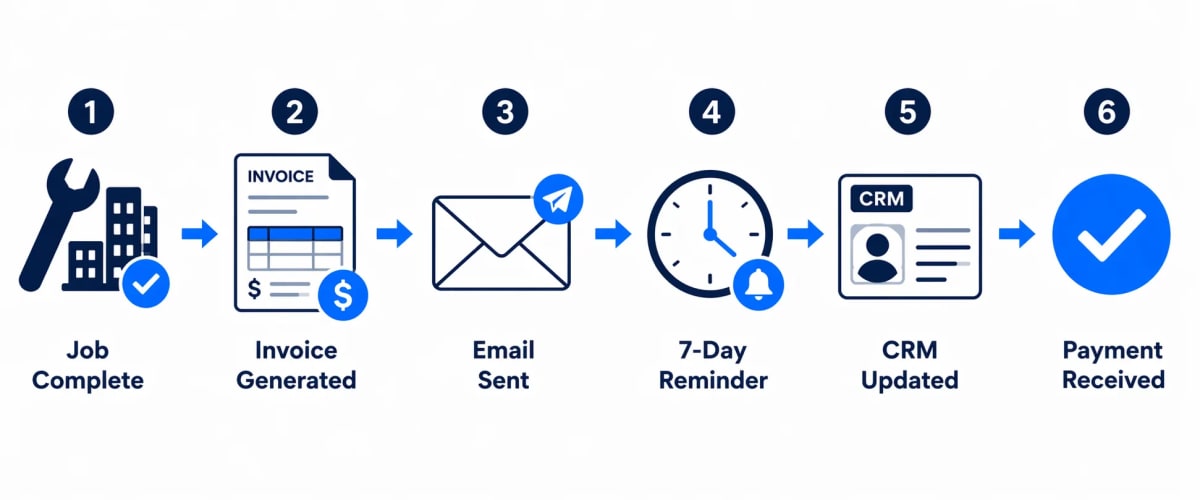
A complete invoicing automation sequence looks like this:
- Job marked as complete in the CRM
- Invoice generated automatically from client and job data
- Invoice emailed to the client with a payment link
- If unpaid after 7 days, first reminder sent automatically
- If unpaid after 14 days, second reminder sent
- Payment received: CRM and accounting records updated
No one writes a single email. No one updates a single record.
Done-for-You vs. Building It Yourself
There are two ways to get these automations in place: build them yourself using a platform like Make or n8n, or have a specialist build them for you.
| DIY (Make / n8n) | Done-for-You (Automiq AI) | |
|---|---|---|
| Upfront time | 20 to 40 hours of owner time | None |
| Technical skill required | Medium to high | None |
| Time to live system | Weeks to months | 1 to 2 weeks |
| Ongoing maintenance | Owner handles it | Covered 30 to 60 days post-launch |
| Cost model | $20 to $60/month for the tool | One-time fixed fee |
DIY automation is a reasonable choice if someone on your team has the technical skill and the time to build and maintain it. For most contractors running a 3 to 15-person business, that person does not exist.
Done-for-you automation delivers a working system without pulling you away from billable work. The underlying tools (Make, n8n, OpenAI) are the same — you just do not have to touch them.
The AI automation for construction businesses page covers what a full implementation looks like for contractors specifically, including which workflows typically go live first.
Frequently Asked Questions
How does AI automation for construction companies actually work?
AI automation connects the tools you already use and triggers actions between them automatically. When a lead submits a contact form, your CRM auto-populates, a confirmation email goes out, and you get notified, without anyone typing anything. No new platforms are required.
Do I need to replace my current software to automate my construction business?
No. The automation layer connects your existing tools and triggers actions between them. You do not migrate to a new platform; you make the one you already have work harder.
How long does it take to set up automation for a construction company?
A done-for-you implementation takes 1 to 2 weeks from discovery call to a live system. DIY setup using Make or n8n typically takes 20 to 40 hours of owner time before anything runs reliably.
Which construction admin task should I automate first?
Start with your highest-frequency pain point. For most contractors, that is either lead follow-up or CRM updates after calls and site visits. Both deliver visible time savings within the first week.
What does AI automation for construction companies cost?
Done-for-you packages with Automiq AI start from $99 for a single workflow and $699 to $1,699 for up to five workflows. Most contractors recover that investment within 30 to 60 days in admin time saved.
What if my team is not technical?
That is the point of done-for-you automation. The system is built and tested for you, then handed over as a running workflow. Your team interacts only with the tools they already know.
Most construction companies are absorbing 10 or more hours of admin work per week that AI can handle automatically. The question is not whether automation applies to your business. It is which task you start with.
Book a free discovery call with Automiq AI and get a custom automation blueprint for your construction company. We will map out which workflows recover the most time first. Book your call