EN
EN DE
DE ES
ES FR
FR NL
NL PT
PT
Quick Answer: AI automation for recruitment agencies eliminates 30-40 hours of manual admin per week by running candidate outreach sequences, interview scheduling, and ATS updates automatically inside your existing tools. No ATS migration, no new platform to learn, and no extra headcount required.
If your recruiters are good at their jobs but spending half their week on emails, calendar coordination, and copy-pasting notes into your ATS, the problem is not your team. According to the Atlas State of Agency Recruitment Benchmark Report 2026, 36.99% of recruitment agencies identify too much manual work as their single biggest operational barrier. Not a weak pipeline. Not bad hires. Admin.
This guide covers exactly which workflows ai automation for recruitment agencies targets first, what each automation looks like in practice, and what results you can expect in the first 30 days.
Where Recruitment Agencies Lose 10+ Hours a Week
Most agency owners know their team is busy. What is harder to see is where the hours are actually going.
A recruiter managing 15 active requisitions spends 30-40 hours per week on tasks that AI can automate, according to Intervuebox’s 2026 staffing automation analysis. That is nearly a full working week’s worth of admin output, per recruiter, every single week.
Break it down by task category and the pattern is consistent across agency sizes:
- Outreach: Writing and personalising individual emails for every new candidate, then manually logging each message in the ATS
- Scheduling: Emailing back and forth to find a slot that works for the candidate, the hiring manager, and whoever else joins the panel
- ATS updates: After every call, transcribing notes, updating the candidate stage, and flagging the client with a status email
- Follow-up: Sending “just checking in” messages to candidates who have not responded, or chasing clients for feedback after interviews
Each task takes 5-15 minutes in isolation. Across a full day at volume, they consume 6-8 hours. The recruiter never gets to the work that actually requires their judgement: assessing cultural fit, building candidate relationships, negotiating placements.
The fix is not hiring more admin support. It is automating the tasks that never needed a human in the first place.
Automated Candidate Outreach: From Manually Written to Done in Seconds
Here is how outreach typically works at a non-automated agency: a recruiter identifies a candidate, opens Gmail, writes a personalised subject line, drafts a message referencing the candidate’s background and the target role, sends it, then logs it manually in the ATS. Then they do it again. Forty times.
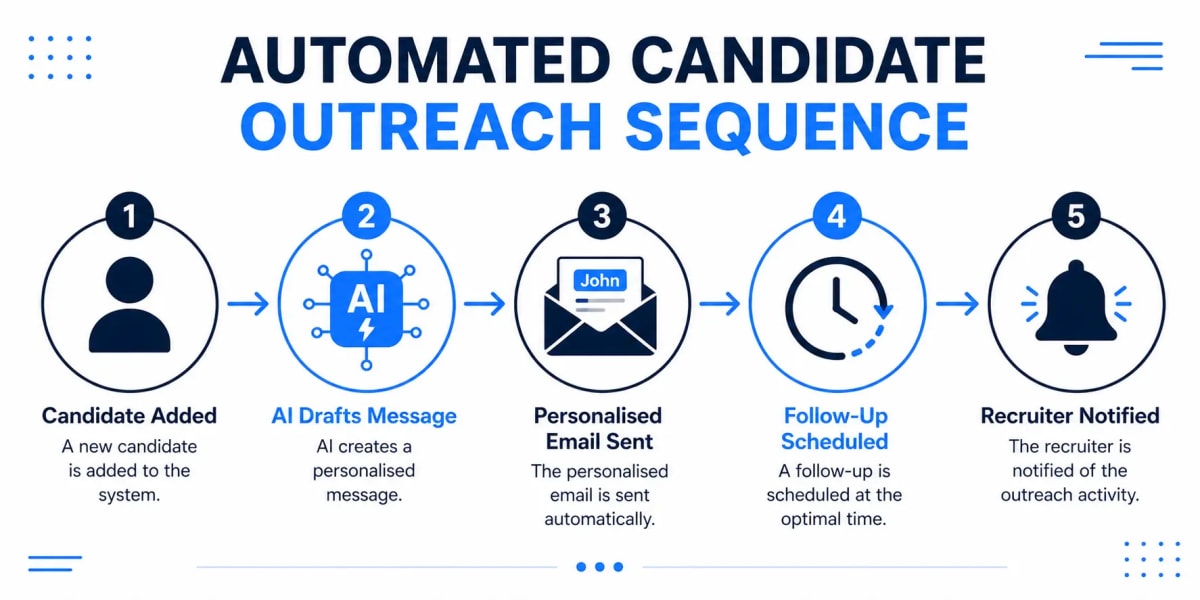
With an automated outreach workflow, the sequence looks different: a candidate is added to a sourcing list, the system automatically drafts and sends a personalised first message using data already in the ATS (name, current role, location, target position), and follow-up messages go out on a schedule if there is no reply. When a candidate responds, the recruiter gets a notification and takes over from that point. Before that, they are not involved.
The automation runs inside Gmail or Outlook. Your recruiters’ email clients stay the same. Candidates receive messages that read like personal emails because the personalisation pulls from real profile data, not a generic template.
According to the Atlas AI in Agency Recruitment Report, 60% of agencies now automate messaging and outreach tasks. The agencies that are not doing this are competing on recruiter effort against agencies competing on systems. That gap widens every month.
Interview Scheduling: Stop Playing Calendar Tennis
Interview scheduling is one of the most underestimated time drains in recruitment. A single interview can take 4-6 emails to book: proposing times, waiting for a response, counter-proposing, confirming, sending a calendar invite, then chasing a reminder when the candidate does not show.
Multiply that across every interview, across every active role, and you have a significant portion of the week gone to calendar coordination before a single placement decision is made.
An automated scheduling workflow removes all of that friction. When a candidate advances to the interview stage, the system sends a scheduling link connected directly to the interviewer’s calendar. The candidate picks a slot. A confirmation goes out to both parties automatically. A reminder is sent 24 hours before. If the candidate cancels, a rebooking sequence starts without any manual input from your team.
The result, according to Intervuebox’s 2026 staffing automation analysis, is interview scheduling lead time reduced from 4-6 days down to under 24 hours, with overall interview cycles compressed by 20-30%. For roles where the best candidates are off the market within 10 days, that speed difference determines whether you place the candidate or another agency does.
The scheduling automation connects to Google Calendar, Outlook, or Calendly. No new calendar tool required.
Want to see how Automiq AI sets this up inside your existing recruitment stack? Explore the recruitment agency automation setup and see which workflows fit your agency’s size and volume.
ATS Updates After Every Call, Submission, and Status Change
The ATS is only useful when it is accurate. In most recruitment agencies, it is not.
A recruiter finishes a 20-minute screening call. Then they spend 10-15 minutes transcribing notes into the ATS, updating the candidate’s stage, drafting a status update for the client, and sending it. That is 50% overhead on every call that required genuine skill to run. Across 8-10 calls in a day, that overhead adds up to 90 minutes of admin that produces no new placements.
With automation, the workflow changes immediately: the call ends, an AI-generated summary is created from the recording or structured call notes, the ATS record is updated automatically with the summary, stage change, and timestamp, and a client status email is drafted and queued for the recruiter to review and approve in one click. Your recruiter does the review. Not the data entry.
This does not require an ATS migration. The automation layer connects to your existing ATS via API, whether that is Bullhorn, Vincere, JobAdder, or another platform. Your team keeps working in the same interface they already know.
Faster ATS updates also produce a direct service quality improvement: when every interaction is logged in real time, clients see accurate pipeline status without the recruiter having to compile it manually. For a look at how this kind of manual work reduction plays out across service businesses more broadly, see how AI reduces manual work in service-based businesses.
AI Automation for Recruitment Agencies: Done-for-You vs. DIY
The tools to connect these systems exist. Platforms like Make and n8n can technically link your ATS, email client, and calendar into an automated workflow. The question is whether you want to build that yourself, or have it built for you.
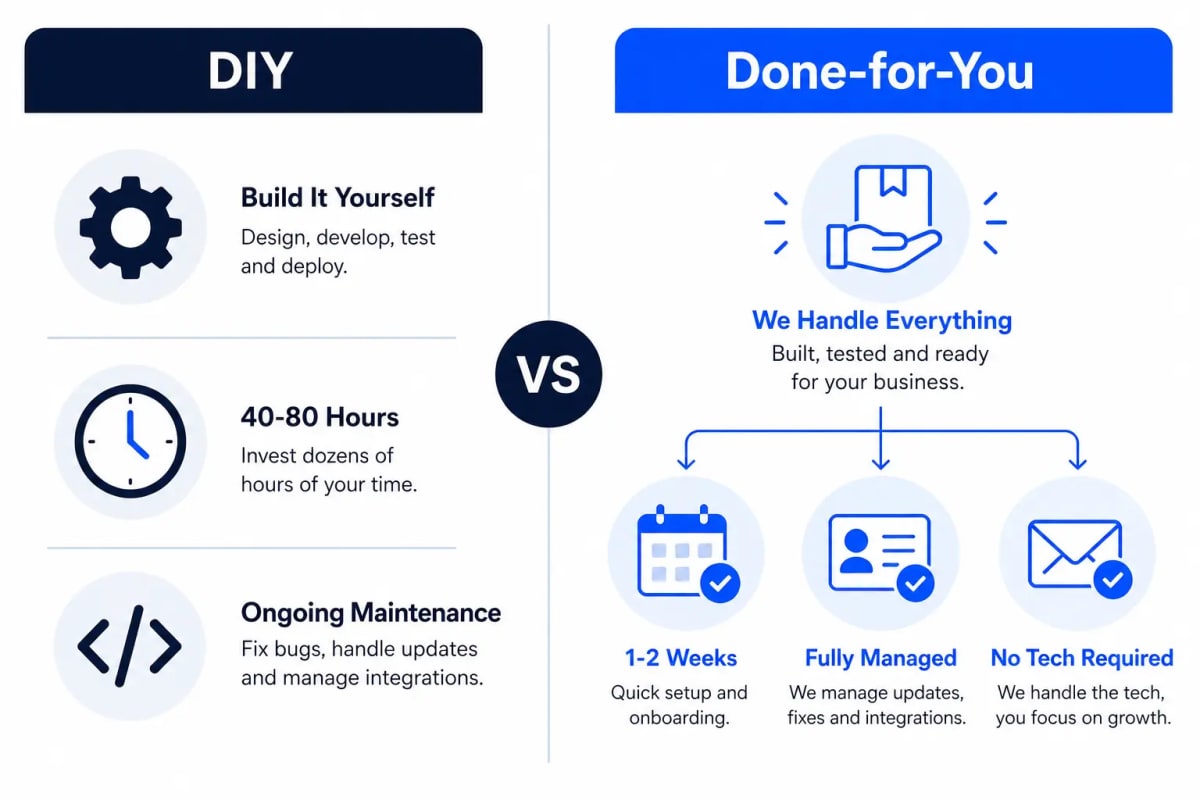
Building it yourself means mapping the workflow logic, setting up API connections, handling authentication, writing error handling for edge cases, and maintaining the system as each connected tool updates its API. For an agency owner or recruiter who is not a developer, that is a 40-80 hour project before you see a single automated email go out.
The comparison looks like this:
| DIY (Make / n8n) | Automiq AI | |
|---|---|---|
| Setup time | 40-80 hours | 1-2 weeks, fully managed |
| Technical knowledge required | Significant | None |
| Ongoing maintenance | Your team | Included in the build |
| Works inside existing tools | Yes, if built correctly | Yes, by design |
| Cost structure | Low tool cost, high time cost | Fixed one-time implementation fee |
If you have a developer on staff with bandwidth for this kind of project, DIY is a reasonable path for simple connections. If you do not, the real cost of DIY is the hours your recruiters spend not placing candidates while someone builds a workflow instead.
Automiq AI builds the automation inside your existing stack in 1-2 weeks on a fixed, one-time fee with no ongoing retainer to us. For a framework to calculate whether the return justifies the investment before you commit, see how to calculate the ROI of AI automation for your business.
What Results to Expect in the First 30 Days
Here is a realistic week-by-week picture for a typical three-workflow setup:
Weeks 1-2: Outreach sequences go live. Recruiters stop writing individual emails for new candidates. The sequence handles the first two to three touchpoints per candidate automatically. Recruiters focus their attention on candidates who have already responded positively.
Weeks 2-3: Scheduling automation goes live. Interview coordination drops from 4-6 days to under 24 hours. Recruiters stop managing calendar threads entirely for initial interviews.
Weeks 3-4: ATS auto-updates are running. Call summaries are logged within minutes of each call ending. Client status emails are queued and ready to send, not written from scratch.
By the end of week four, a recruiter managing 15 active requisitions has typically recovered 15-25 hours per week across the three workflows. Data from AdAI’s 2026 recruitment statistics report shows agencies using AI tools in screening achieve 75% faster candidate screening compared to manual processes. Speed in screening directly affects placement rate when the best candidates make decisions quickly.
For an agency with five or more recruiters, the compound effect is 75-125 hours per week recovered across the team. That is capacity for more roles without more headcount. If you want to understand the broader lead-response implications of faster candidate engagement, how automating lead follow-up prevents prospects going cold covers the same principle applied to inbound leads.
Frequently Asked Questions
What does AI automation for recruitment agencies actually automate?
AI automation handles the repetitive admin that fills recruiters’ days: candidate outreach sequences, interview scheduling coordination, ATS record updates after calls, and follow-up emails to candidates and clients. It runs inside your existing tools so your team works the same way they already do, just without the manual steps between actions.
Do I need to switch my ATS to use AI automation?
No. The automation layer connects to whichever ATS you already use via API, whether that is Bullhorn, Vincere, JobAdder, or another platform. There is no migration, no data transfer, and no retraining required. Your team keeps working in the same interface they know.
How long does implementation take for a small recruitment agency?
A typical three-workflow setup covering outreach, scheduling, and ATS updates takes 1-2 weeks from discovery call to live system. You do not need to pause operations or run a parallel process. The automation is built around your existing workflow, not as a replacement for it.
Will AI outreach feel impersonal to candidates?
Only if it is poorly configured. Well-built outreach sequences pull from the candidate’s profile to personalise each message using real data: name, current role, location, and target position. When set up correctly, candidates cannot distinguish a properly built AI sequence from a personally written email. Generic templates are a configuration problem, not an AI problem.
What if my agency only has 5 active requisitions?
The time savings are proportional. Five active requisitions typically yields 8-15 hours per week recovered across the three core workflows. That is still meaningful for a small agency where every hour matters. Automiq AI’s pricing page covers the Growth Package, which is designed for teams at exactly this scale.
Conclusion
Recruitment agencies do not lose placements because their recruiters are bad at recruiting. They lose them because their best people are spending half the week on admin that should not require human input.
AI automation for recruitment agencies fixes the systems problem so the human skill problem stays front and centre. Your recruiters assess fit, build candidate relationships, and close placements. The automation handles everything in between.
If you want to see which workflows make sense for your agency’s size and volume, book a free discovery call with Automiq AI. The first conversation maps your current process and identifies exactly where the hours are going.