EN
EN DE
DE ES
ES FR
FR NL
NL PT
PT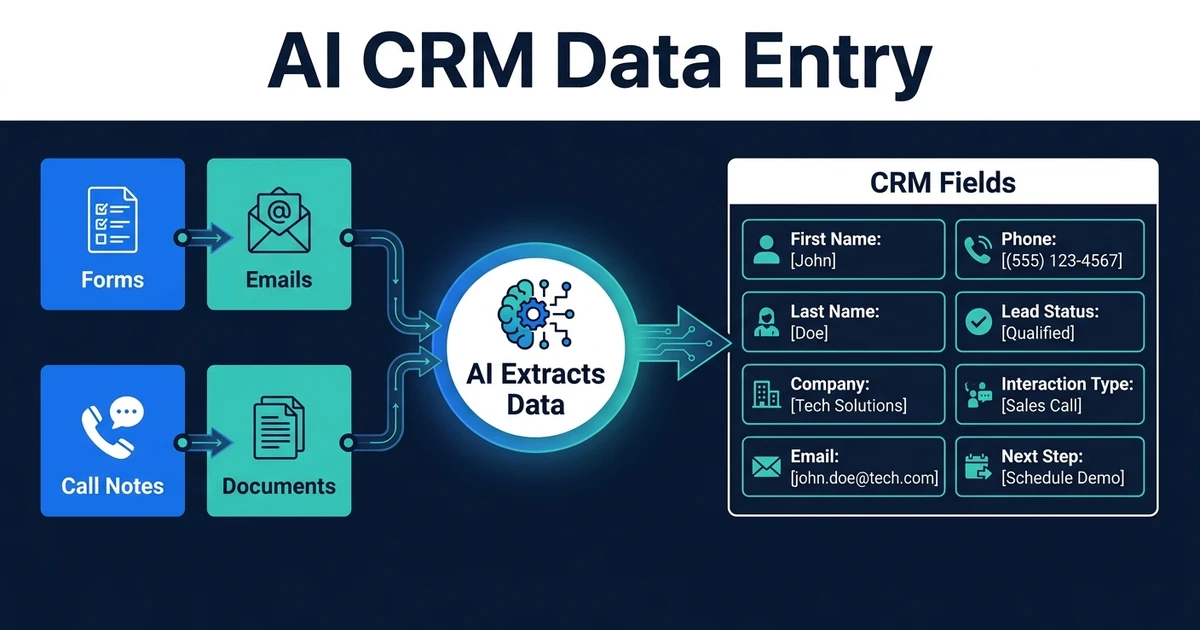
Quick Answer: AI CRM data entry uses AI to extract useful information from emails, forms, call notes, documents, and spreadsheets, then place it into the right CRM fields. It reduces copy-paste work while keeping a human review step for uncertain or high-impact changes.
AI-assisted CRM entry is for the work nobody wants to own but every CRM depends on.
Your team already has the details. They sit in form submissions, emails, meeting notes, call summaries, PDFs, spreadsheets, and intake documents. The problem is moving that information into the right CRM fields without burning time.
Manual entry is not a growth strategy. It is a tax on every customer interaction.
Why Manual CRM Data Entry Costs More Than It Looks
Manual CRM data entry looks small when you measure one record. A name, company, service need, source, note, and next task may only take a few minutes.
The problem is repetition. When every lead, client, meeting, and follow-up creates another copy-paste task, your CRM becomes a second job instead of a system that supports the first one.
Bad entry also creates bad decisions. Missing service needs weaken follow-up. Inconsistent company names create duplicates. Vague notes make the next conversation harder than it should be.
McKinsey found that generative AI and other technologies could automate activities absorbing 60 to 70 percent of employee time in its productivity analysis. CRM data entry fits that opportunity because it is repetitive, text-heavy, and tied to existing business systems.
What Is AI CRM Data Entry?
This process uses AI to read unstructured or semi-structured inputs and turn them into CRM-ready fields. The workflow identifies what matters, formats it, checks it, and writes it to the right record.
It can process:
- Website forms
- Email enquiries
- Call notes and transcripts
- Meeting summaries
- Uploaded documents
- Spreadsheets
- Intake questionnaires
The goal is not to let AI make every customer decision. The goal is to stop asking humans to move obvious data from one box to another.
This is where AI integration with your current CRM matters. The workflow needs to connect source systems to CRM fields in a controlled way, not dump raw text into notes and call it automation.
Which CRM Data Sources Can AI Capture?
Start with the sources your team already checks manually. If someone opens an inbox, form tool, document folder, or call note just to copy details into the CRM, that source is a candidate.
The best early sources are usually forms and emails because they already carry customer intent. A form might include service type, budget range, location, and urgency. An email might include the same details in free text.
Call notes and meeting summaries are also strong sources, especially for service businesses where the sales conversation changes the next step. AI can extract the customer’s pain, timeline, objections, promised follow-up, and missing fields.
Documents can help too, but they should stay focused. If a contract, intake form, or application contains CRM data, AI document processing can extract the relevant fields before the CRM workflow validates them.
How AI Turns Unstructured Inputs Into CRM Fields
The workflow starts by reading the source input. It then classifies the information, matches it to CRM fields, checks for duplicates, and decides whether to update automatically or ask for review.
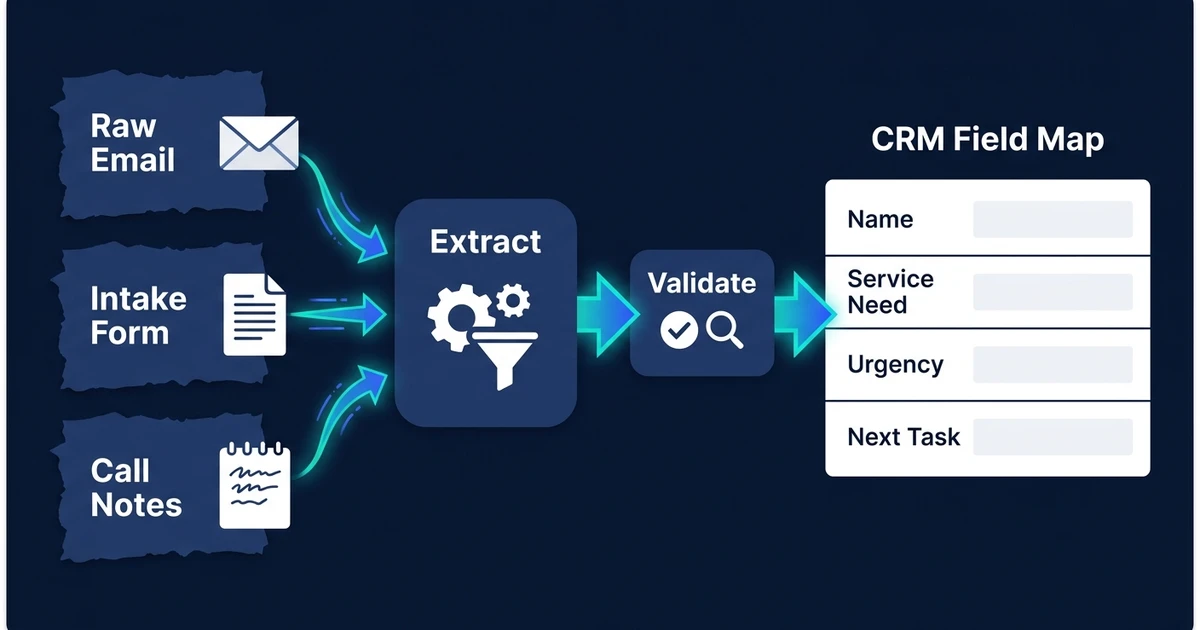
A practical flow looks like this:
- Capture the source input.
- Identify the contact or company.
- Extract field values.
- Normalize formats.
- Check for duplicates or conflicts.
- Write safe fields to the CRM.
- Flag uncertain fields for review.
The review step is what keeps the CRM trustworthy. If the system is unsure whether “Acme Ltd” and “Acme Limited” are the same company, it should not create a duplicate silently.
MIT Sloan reported that 93% of chief data officers say data strategy is crucial to deriving value from generative AI, while 57% have not made the necessary data strategy changes in its data executive research. CRM data-entry automation needs that same discipline.
Where Human Review Still Matters
Human review matters anywhere a wrong update could create revenue, compliance, or customer trust problems. AI can extract and suggest. Your workflow decides what is safe to write.
Low-risk fields might include a call summary, source note, non-critical tag, or next-task draft. Higher-risk fields include deal value, contract status, legal category, account owner, and final qualification status.
Use a confidence-based review model. If the input is clear and the field is low-risk, update it. If the input is ambiguous or the field matters, send it to a person.
That balance is the difference between useful automation and automated mess. You want less admin, not faster bad data.
AI-Assisted CRM Entry vs Automated CRM Updates
These two workflows are related, but they solve different problems.
AI-assisted CRM entry handles capture. It turns messy source information into structured CRM fields. Automated updates handle maintenance. They keep records current after activity happens.
| Workflow | Main Job | Best Source | Best Outcome |
|---|---|---|---|
| AI-assisted CRM entry | Capture and structure data | Forms, emails, documents, notes | Complete fields without copy-paste |
| Automated CRM updates | Keep records current | Calls, meetings, emails, tasks | Fresh notes, tasks, and status changes |
| Contact enrichment | Add missing context | Existing CRM records and enrichment sources | Better segmentation and outreach context |
If your team spends time moving data into the CRM, start with data entry. If records already exist but fall behind after interactions, start with updates.
A Practical Workflow From Intake Form to Complete CRM Record
Imagine a small agency that receives service enquiries from a website form. The form captures a name, email, company, service interest, budget range, and a free-text message.
Without automation, someone copies the details into the CRM, checks whether the company already exists, adds a note, sets a task, and assigns the owner.
With an AI-assisted entry workflow, the system does most of that:
- The form submission arrives.
- The workflow checks for an existing contact or company.
- AI extracts service need, urgency, and missing context from the message.
- The CRM record updates with the mapped fields.
- A follow-up task is created for the owner.
- Any duplicate or unclear field is flagged.
Deloitte reports that 66% of organizations using AI have achieved productivity and efficiency gains in its enterprise AI research. This is the practical version: fewer manual entry steps and cleaner CRM records.
If your CRM data lives in emails, forms, and notes before it reaches the CRM, connect your CRM to the places data already lives. Automiq AI can map the fields, review rules, and exception paths before launch.
Frequently Asked Questions
What is AI-assisted CRM entry?
It uses AI to extract information from emails, forms, notes, documents, and calls, then place it into the right CRM fields. It removes manual copy-paste while keeping review steps for uncertain data.
Can AI-assisted CRM entry work with forms and emails?
Yes. Forms and emails are strong starting points because they already contain useful customer details, but they often arrive in inconsistent formats. AI can classify the information and map it to the CRM fields your team actually uses.
Is AI-assisted CRM entry safe for important customer fields?
It can be safe when the workflow includes validation, duplicate checks, and human review for uncertain changes. High-impact fields should not be overwritten without rules.
How is AI-assisted CRM entry different from automated CRM updates?
AI-assisted entry focuses on capturing and structuring data from source inputs. Automated CRM updates focus on keeping existing records current after activity such as calls, emails, and meetings.
What CRM data should not be entered automatically?
Avoid automatically changing fields that affect contracts, pricing, legal status, or major pipeline decisions unless a human reviews them. Automation should remove admin, not remove accountability.
Replace Copy-Paste With a CRM Data Workflow
Your CRM should not require your team to copy the same facts across forms, emails, notes, documents, and fields. That is exactly the kind of work automation should remove.
The workflow gives your team cleaner records without turning every customer interaction into admin time.
If manual entry is slowing your team down, book a call to map your CRM data-entry workflow. Automiq AI will identify the source inputs, CRM fields, review rules, and first workflow worth building.