EN
EN DE
DE ES
ES FR
FR NL
NL PT
PT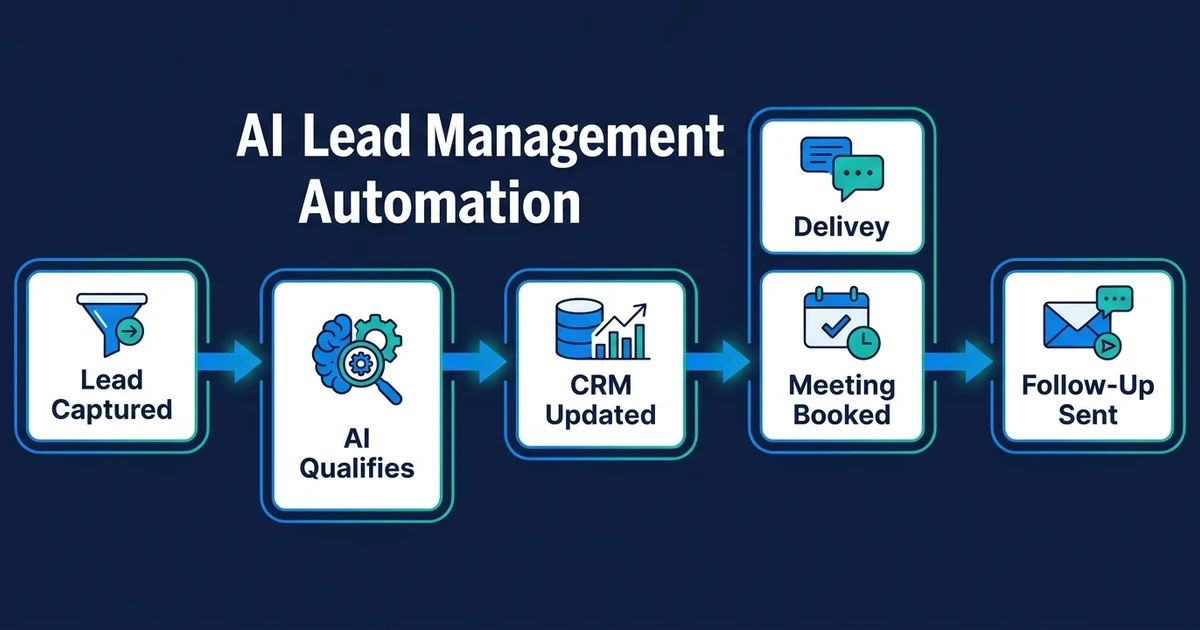
Quick Answer: AI lead management automation captures inbound leads, scores and qualifies them, routes each one to the right next step, sends timely follow-up, and updates your CRM automatically. The strongest setup runs inside the tools you already use, so your team gets faster responses, cleaner records, and fewer missed opportunities without adopting a new operating system.
Most lead problems do not look dramatic from the outside. A form sits in an inbox for three hours. A promising prospect gets the same generic reply as everyone else. A sales rep forgets to update the CRM after a call. Nobody notices until the deal is cold.
That is the real cost of manual lead management. It is not one mistake. It is a chain of small delays that turn buying intent into admin work.
Why Manual Lead Management Breaks as Lead Volume Grows
Manual lead management works when you get a few inquiries a week and one person owns the whole process. Once leads arrive from forms, email, phone calls, social messages, ads, and referral partners, the process starts to crack.
The first failure is speed. A new inquiry comes in, but nobody knows who should answer it. The second failure is context. The person replying does not know whether the lead is a strong fit, an existing contact, or a low-priority request.
The third failure is CRM lag. Your CRM should be the source of truth, but manual updates usually happen after the work, not during it. That means your pipeline shows yesterday’s version of reality.
For a small service business, those gaps show up as:
- Leads waiting in a shared inbox
- Duplicate contacts in the CRM
- Follow-up tasks created from memory
- High-intent prospects getting slow replies
- Unqualified leads taking the same time as qualified ones
- Owners checking every inquiry because no triage system exists
This is exactly where AI belongs. McKinsey found that generative AI and other technologies can automate work activities that absorb 60 to 70 percent of employee time today in its analysis of automation potential. Lead management is full of those repeatable activities: reading, classifying, routing, logging, summarizing, and triggering next steps.
What Is AI Lead Management Automation?
AI lead management automation is a connected workflow that handles the operational steps between “new lead arrived” and “the right next action happened.” It is broader than a chatbot, broader than an auto-reply, and broader than a CRM notification.
A simple auto-reply says, “Thanks, we received your message.” A real lead management workflow asks: Who is this lead? What do they need? Are they a fit? How urgent is the request? Who should handle it? What should happen if nobody responds?
That distinction matters. If your system only sends a generic email, your team still has to read the inquiry, create the CRM record, check whether the lead qualifies, assign the owner, send a follow-up, and remember the next task.
AI lead automation removes those handoffs. The workflow reads the inquiry, extracts the useful details, compares the lead against your criteria, updates the CRM, triggers the next message, and alerts the right person when human judgment is needed.
The goal is not to make your sales process feel more technical. The goal is to make your lead response consistent, fast, and visible.
What an Automated Lead Management Workflow Includes
A strong automated lead management workflow covers the full lead journey, not just the first reply. If one step stays manual, that step becomes the new bottleneck.
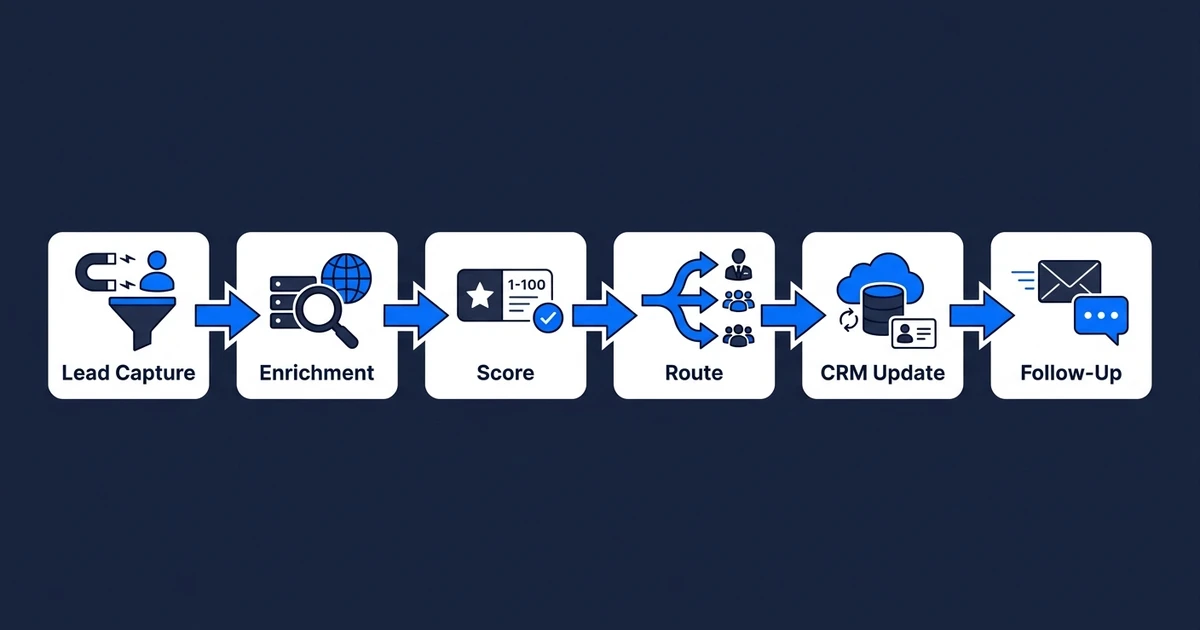
The core workflow usually includes:
- Lead capture: Pulls inquiries from website forms, email, chat, ad forms, call summaries, and booking tools.
- Lead enrichment: Adds company, role, source, location, or previous CRM history when available.
- Lead scoring: Ranks fit and urgency using your ideal customer profile, stated need, timeline, budget signals, and source.
- Qualification: Decides whether the lead should go to sales, receive a nurture reply, ask follow-up questions, or be parked for review.
- Routing: Sends the lead to the right owner, territory, inbox, pipeline, or service category.
- Automated response: Sends a relevant first reply instead of the same message to every lead.
- CRM update: Creates or updates the contact, deal, task, source, score, notes, and follow-up status.
- Follow-up sequence: Keeps warm leads moving instead of relying on someone to remember.
- Escalation: Flags edge cases for a person when the lead is high-value, unclear, sensitive, or outside normal rules.
- Reporting: Shows which sources create qualified leads and where response delays still happen.
This is why AI CRM updates matter inside lead automation. A fast reply is useful, but clean CRM data is what lets the rest of the process work without guesswork.
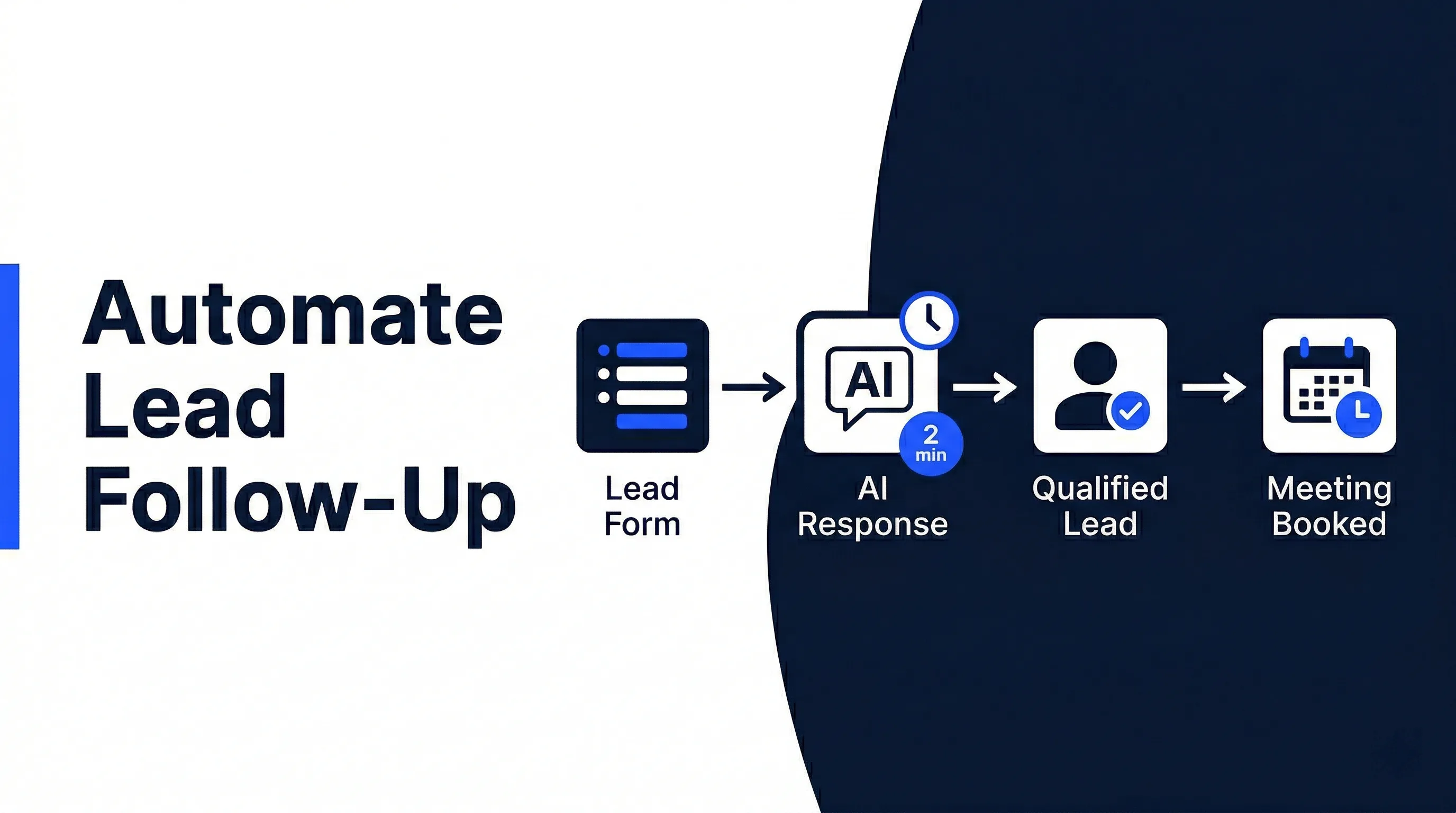
The same principle applies to follow-up. A lead that receives one quick reply and then silence is still leaking from the pipeline. If follow-up is your biggest bottleneck, the guide on how to automate lead follow-up shows the focused version of this workflow.
How AI Lead Automation Works From First Inquiry to Booked Call
Take a professional services firm that receives inquiries from its website, referrals, and email. Before automation, the owner reads every message, decides whether it is worth pursuing, writes a reply, creates a CRM record, and sends a scheduling link.
That process might only take a few minutes per lead. The problem is interruption. The owner handles lead admin between client work, calls, and project delivery, so response time depends on when they happen to check the inbox.
With AI lead automation, the workflow runs like this:
- A new inquiry arrives from a website form.
- The system reads the message and extracts service need, location, urgency, company type, and budget clues.
- The workflow checks whether the contact already exists in the CRM.
- AI scores fit and urgency against the firm’s qualification rules.
- Qualified leads receive a personalized reply with a booking link.
- Lower-fit leads receive a polite qualifying question or nurture response.
- The CRM record updates with source, score, status, summary, and next task.
- The right team member receives a notification with the lead summary and suggested action.
- If the lead books a call, the workflow updates the deal stage and adds the meeting context.
The difference is not just speed. It is consistency. Every lead goes through the same decision path, even when your team is busy, offline, or focused on delivery.
That matters because sales teams that work well with AI tools perform differently. Gartner surveyed 1,026 B2B sellers in early 2024 and found that sellers who effectively partner with AI tools are 3.7 times more likely to meet quota according to its sales survey.
Automiq AI builds done-for-you lead response systems that qualify, respond, book, and update CRM records inside your existing tools. See AI automation pricing if you want a working lead workflow without spending weeks learning automation software.
Where AI Lead Scoring Fits Into the System
Lead scoring is one layer of the lead management system. It tells the workflow how valuable, urgent, or sales-ready a lead appears to be.
It should not operate in isolation. A score that sits in the CRM without triggering action is just another field for your team to ignore. The useful version of scoring changes what happens next.
For example:
- Score 85 to 100: notify sales immediately and send a booking link
- Score 60 to 84: send a personalized response and create a same-day follow-up task
- Score 30 to 59: ask one clarifying question and add the lead to nurture
- Score below 30: tag as low fit and keep a record without interrupting sales
This is where an AI lead qualification system becomes valuable. Scoring ranks the lead. Qualification decides the next step.
A dedicated AI lead scoring guide goes deeper into model inputs, fit criteria, thresholds, and feedback loops. For the pillar workflow, the main point is simpler: scoring only matters when it is tied to routing, response, and follow-up.
DIY Tools vs Done-for-You Lead Management Automation
You can build a simple lead workflow yourself. If all you need is “new form submission sends an email,” a DIY automation tool may be enough.
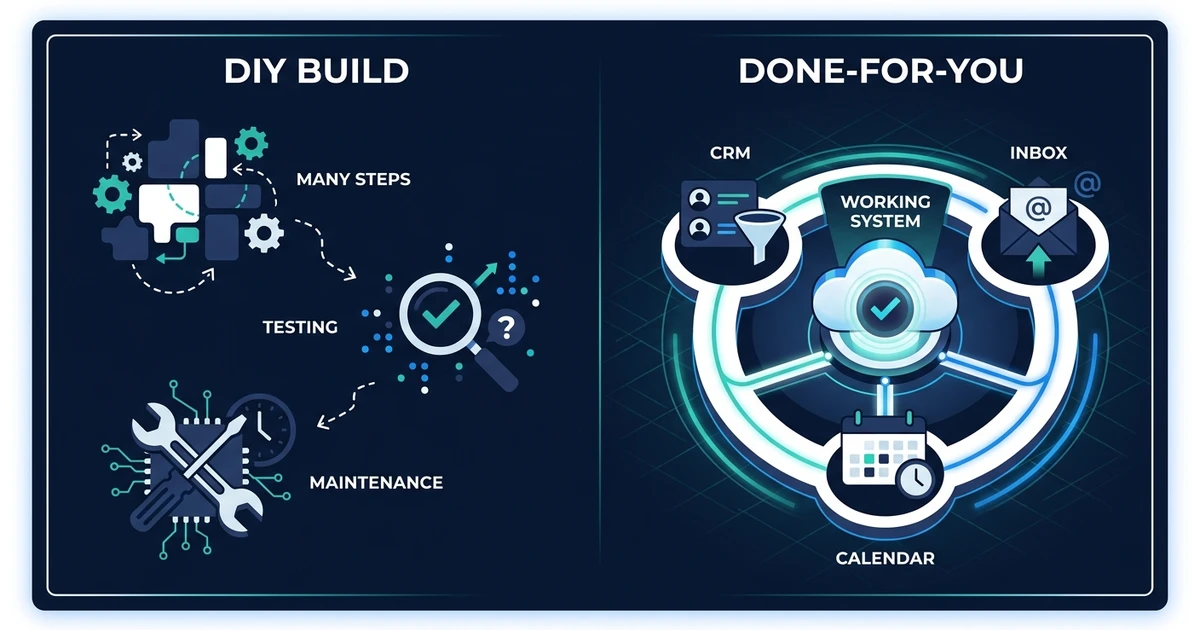
The complexity starts when the workflow needs judgment. You may need to check whether the contact already exists, identify service fit, score the lead, update the CRM, choose a rep, send a tailored reply, create a follow-up task, and escalate edge cases.
| Option | Best fit | Main tradeoff |
|---|---|---|
| DIY automation tool | One simple trigger and one simple action | You still design, test, fix, and maintain the workflow yourself |
| Freelancer or internal build | A defined technical task with clear specs | Quality depends on how well you define the process before build starts |
| Automiq AI done-for-you workflow | Multi-step lead response, scoring, CRM, routing, and follow-up | Higher upfront planning, but you receive a working system built around your process |
The right choice depends on how expensive the problem is. If slow follow-up only annoys you occasionally, keep it simple. If lead handling costs hours every week or causes good prospects to fall through the cracks, a proper workflow pays for itself faster.
Deloitte’s 2024 enterprise GenAI research shows why implementation discipline matters. Over two-thirds of surveyed organizations said 30 percent or fewer of their GenAI experiments would be fully scaled in the next three to six months in Deloitte’s State of Generative AI in the Enterprise. The lesson for small businesses is clear: the tool is not the hard part. Turning the workflow into daily operations is the hard part.
How to Evaluate Whether Your Lead Management Process Is Ready for AI
AI works best when your process has patterns. You do not need a perfect sales operation, but you do need enough structure for the workflow to make reliable decisions.
Start with these questions:
- Do you know what makes a lead qualified?
- Do leads arrive from repeatable sources?
- Does your team use a CRM or at least one consistent tracking system?
- Do you have standard next steps for hot, warm, cold, and poor-fit leads?
- Do you know which leads should trigger a phone call, email, booking link, or nurture sequence?
- Can you describe what should happen when a lead is unclear?
If you can answer those questions, AI workflow design can turn the logic into an automation blueprint. If you cannot answer them yet, the first step is process cleanup, not software setup.
Watch for these warning signs before you automate:
- Every team member qualifies leads differently
- Your CRM has duplicate or stale records
- Nobody owns follow-up after the first reply
- Lead sources are not tagged consistently
- You cannot explain why good leads convert
Automation magnifies the process you give it. A clear process becomes faster. A messy process becomes a faster mess.
Frequently Asked Questions
What is automated lead management?
It is a workflow that captures, qualifies, routes, follows up with, and logs leads automatically. It connects the steps that usually happen across inboxes, forms, CRMs, calendars, and team chats.
How does automated lead management improve response time?
It removes the delay between a lead arriving and a person noticing it. The workflow can read the inquiry, create the CRM record, send the first response, and notify the right person within minutes.
Is lead scoring the same as lead management automation?
No. Lead scoring ranks a lead based on fit and intent. Lead management automation uses that score to trigger the next action, such as routing to sales, sending a booking link, or starting a nurture sequence.
Can AI lead automation work with my existing CRM?
Yes, if your CRM can receive updates through integrations, forms, email parsing, or workflow tools. The best setup keeps your existing CRM as the source of truth rather than forcing your team to move into a new system.
What should I automate first in lead management?
Start with the slowest handoff. For many businesses, that is the gap between a form submission and the first qualified response. Once that works, add scoring, CRM updates, routing, and follow-up sequences.
When is done-for-you automation better than DIY?
Done-for-you automation makes sense when your workflow has several steps, several tools, or real routing decisions. DIY is fine for a simple alert, but a full lead management system needs process design, testing, and maintenance planning.
Build a Lead Management System That Responds Before Competitors Do
Lead management is not one task. It is a chain of decisions that starts the moment a prospect raises their hand.
If that chain depends on someone checking an inbox, reading the message, remembering the rules, updating the CRM, and following up later, good leads will keep slipping. Not because your team is careless. Because the process is too manual.
Automiq AI’s AI automation services build the full workflow inside your CRM, inbox, forms, and calendar. You get faster lead response, cleaner records, and a sales process that keeps moving even when your team is busy.