EN
EN DE
DE ES
ES FR
FR NL
NL PT
PT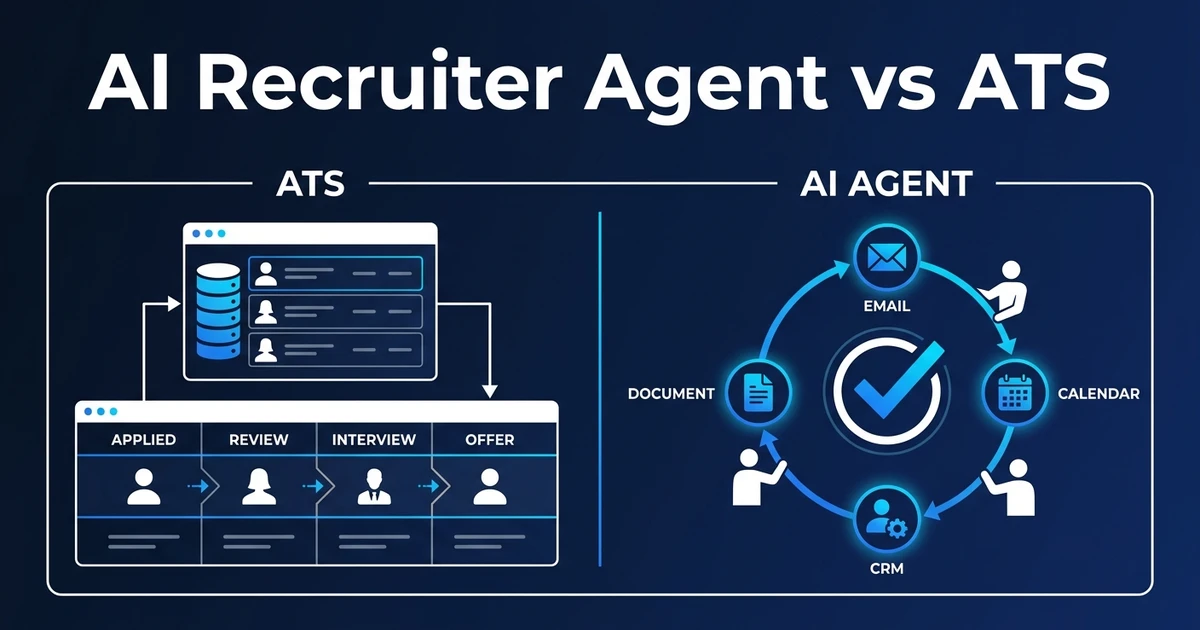
Quick Answer: An ATS is your system of record for jobs, candidates, applications, and hiring stages. An AI recruiter agent is a workflow layer that can use ATS data, email, calendar, CRM notes, and recruiter instructions to move repeatable hiring admin forward, but it should not replace your ATS or make final hiring decisions.
AI recruiter agent vs ATS is not a replacement question. It is a workflow question.
Your ATS should keep the truth: candidate records, job records, stages, source history, notes, and reporting. An AI recruiter agent should help move the admin around those records faster.
That distinction matters because recruiting teams are adopting AI quickly. LinkedIn reports that 73% of talent acquisition professionals agree AI will change how organizations hire in its 2025 Future of Recruiting report.
The teams that benefit most will not throw away their ATS. They will connect better workflows around it.
Why AI recruiter agent vs ATS is the wrong replacement question
The wrong question is, “Will an AI recruiter agent replace my ATS?” The better question is, “Which work should stay in the ATS, and which work needs help outside it?”
An ATS is built to store and manage hiring records. It is excellent for structure: jobs, candidates, applications, stages, owners, notes, and reports.
An AI recruiter agent is built for coordination. It can read context, draft next steps, check missing information, summarize notes, and prepare updates across email, CRM, calendar, and documents.
When you separate those jobs, the decision gets easier. Keep the ATS as the record. Use the agent to reduce the manual work around the record.
What does an ATS actually automate?
ATS automation usually works through rules and templates. If a candidate moves to a stage, the ATS can send a message, create a task, or update a field.
That is useful. It keeps the process consistent and prevents basic steps from being forgotten.
An ATS can typically handle:
- Candidate and job records
- Application stages
- Job posting workflows
- Basic email templates
- Task reminders
- Pipeline reports
- Source and compliance fields
The limit is context. A basic ATS rule does not understand that a hiring manager replied with unclear feedback, that a candidate needs a different interview slot, or that a client update should include only reviewed shortlist notes.
What does an AI recruiter agent do differently?
An AI recruiter agent can work across context, not just fields. It can read a role brief, compare it with candidate notes, draft a clarification, and prepare the next task for review.
It can also coordinate across tools. Your ATS may hold the candidate record, your email contains the latest reply, your calendar holds availability, and your CRM has the client relationship notes.
The agent’s job is to connect those signals and prepare action. It should not silently change important records or send sensitive messages without approval.
For example, after an interview, the agent can summarize feedback, draft a client update, create a next-step task, and queue an ATS note. The recruiter reviews, edits, and approves before anything becomes official.
AI recruiter agent vs ATS: a practical comparison
The cleanest setup uses both. Your ATS keeps the process stable. The agent reduces the admin between systems.
| Capability | ATS automation | AI recruiter agent |
|---|---|---|
| System of record | Strong fit for jobs, candidates, and stages | Should read and update only through approved rules |
| Workflow coordination | Good inside the ATS | Better across ATS, CRM, email, calendar, and documents |
| Context handling | Limited to fields and rules | Can summarize notes, replies, and role context |
| Human approval | Often stage or permission based | Should be built into every sensitive action |
| Best use case | Standard pipeline management | Multi-step admin around hiring records |
LinkedIn also reports that 37% of recruiting organizations are actively integrating or experimenting with GenAI in the same report. That adoption makes the comparison practical, not theoretical.
The safest route is not replacing one system with another. It is choosing which tool owns which part of the work.
When ATS automation is enough
ATS automation is enough when the workflow is simple, repetitive, and contained inside the ATS. If the trigger and the action both live in the same system, keep it there.
Examples include:
- Sending an application acknowledgement
- Creating a task when a candidate enters a stage
- Updating a standard pipeline report
- Applying a basic tag after form submission
- Reminding a recruiter to review a stale record
Do not add AI where a simple rule works. Simple rules are easier to maintain, easier to explain, and less likely to surprise your team.
The right automation stack uses the lightest tool that solves the job. That is how you avoid expensive complexity.
When an AI recruiter agent is worth adding
An AI recruiter agent is worth adding when the work crosses systems or requires context. That is where manual handoffs multiply.
Common signals include:
- Recruiters copy email replies into the ATS
- Hiring managers send incomplete feedback
- Candidate summaries are written from scratch
- Client updates require data from several systems
- Recruiters maintain spreadsheets beside the ATS
- Follow-up priority depends on notes, timing, and stage
The EEOC’s FY 2024-2028 enforcement plan recognizes AI and machine learning tools used to recruit applicants or assist hiring decisions within its recruitment and hiring priorities. That is another reason to keep the agent controlled, documented, and connected to a system of record.
If your ATS is stable but admin is still leaking hours, Automiq AI can identify one ATS-adjacent workflow to automate without replacing your system. Review one-time AI automation pricing if you want a fixed-fee build instead of another subscription-first rollout.
How to implement AI agents without replacing your ATS
Start by mapping the workflow, not the technology. Pick one admin-heavy process that touches the ATS and at least one other tool.
Then follow a controlled implementation sequence:
- Identify the system of record
- Define the trigger that starts the workflow
- List every tool the workflow touches
- Decide where a human must approve the action
- Document prompts, criteria, and output fields
- Run the workflow beside the manual process for a short pilot
- Tune the process before adding another use case
This is where AI implementation matters. The build should reflect how your recruiters already work, not force them into a new platform.
If the first workflow saves hours and produces cleaner records, expand to the next handoff. If it creates extra review work, narrow the scope.
Frequently Asked Questions
Can an AI recruiter agent replace an ATS?
No. Your ATS should remain the system of record for jobs, candidates, applications, and hiring stages. An AI recruiter agent works around that system to coordinate admin, summaries, reminders, and approved updates.
Is ATS automation the same as AI recruiting automation?
ATS automation usually follows rules inside the ATS, such as stage changes or template emails. AI recruiting automation can interpret context, prepare notes, draft handoffs, and coordinate work across ATS, CRM, email, and calendar.
What should stay inside the ATS?
Candidate records, job records, application status, compliance notes, source history, and final stage changes should stay in the ATS. The agent can prepare updates, but the system of record should remain clean.
What should an AI recruiter agent never decide?
It should not make final hiring decisions, reject candidates without review, negotiate offers, or decide accommodations. Those moments need human judgment and documented accountability.
When should I add an AI recruiter agent to my ATS?
Add one when your ATS stores data well but your recruiters still spend hours moving information between email, calendar, CRM, documents, and client updates. That is a workflow coordination problem, not an ATS replacement problem.
Conclusion: Keep the ATS, automate the work around it
Your ATS should not compete with an AI recruiter agent. They should do different jobs.
Keep the ATS as the system of record. Use the agent to handle the admin around it: summaries, reminders, drafts, missing-info checks, and approved updates.
Automiq AI builds those workflows inside the tools your recruiters already use, with no migration and no new system for the desk to learn. See how AI automation for recruitment agencies can connect the work around your ATS instead of replacing it.