EN
EN DE
DE ES
ES FR
FR NL
NL PT
PT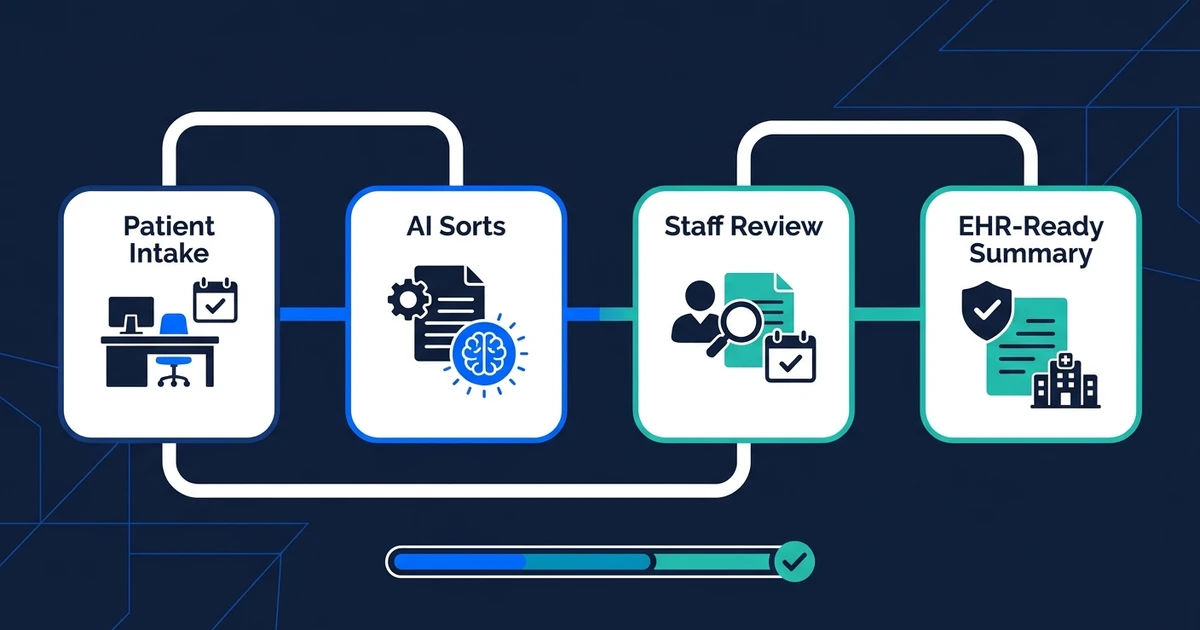
Quick Answer: AI automation for healthcare practices removes repetitive admin work from intake, scheduling, reminders, prior authorization follow-up, portal messages, and EHR-ready updates. The safest systems collect structured information, route work, prepare summaries, and keep humans in control of patient-facing and clinical decisions.
Healthcare practice automation is not about letting software make clinical calls. It is about removing the admin loops that keep your front desk, billers, and clinicians stuck in repeat work.
If you run a clinic, specialty practice, therapy office, dental practice, or multi-provider group, the pattern is familiar. Patients call to book or reschedule. Staff chase missing forms. Insurance details need cleanup. Portal messages pile up. Prior authorization follow-up pulls people away from live patient needs.
The right automation build gives those tasks a clear route. Information comes in once, gets cleaned up, moves to the right person, and creates the next action without three people retyping it.
Where Healthcare Practices Lose the Most Admin Time
Healthcare practices lose hours in the handoffs around care. A patient fills out one form, then staff copy pieces into another system. A scheduling request comes through the portal, then someone checks the calendar manually. A prior authorization update sits in a payer portal until someone remembers to check it.
Those handoffs become workload. MGMA found that 71% of practice leaders reported some use of AI for patient visits, but among practices using AI, only 39% said it had reduced staff workload while 44% said it had not according to its August 2025 poll.
That gap matters. Buying an AI tool does not automatically give your staff time back. The workflow has to be designed around the actual bottleneck: intake, scheduling, message routing, documentation support, revenue cycle follow-up, or EHR-adjacent data entry.
For a five-provider clinic, even small admin loops add up quickly. If front-desk staff spend two hours a day cleaning intake forms, three hours handling reschedules, and another hour checking authorization status, you have a full workday trapped in repeatable tasks.
What AI Automation for Healthcare Practices Should Handle
Healthcare AI automation should handle repeatable administrative work with clear boundaries. It should not diagnose patients, override clinicians, or send sensitive messages without rules.
Good first workflows usually include:
- Patient intake form cleanup and missing-field follow-up.
- Appointment scheduling requests and reminder workflows.
- Portal message triage by topic and urgency.
- Insurance eligibility or prior authorization status follow-up.
- Document extraction from referrals, forms, and attachments.
- Draft summaries for staff review before EHR updates.
MGMA found that 68% of medical groups added or expanded AI tools in 2025, with common uses around documentation, scheduling, reminders, call-center support, message routing, denials, collections, and prior authorization in its September 2025 poll.
That list is the practical lane. Most small practices do not need an abstract AI strategy. They need one broken workflow mapped, automated, tested, and handed over.
Patient Intake Automation for Forms, Insurance, and EHR-Ready Data
Patient intake is one of the cleanest places to start because the inputs are structured enough to control. The workflow can collect forms, identify missing fields, extract insurance details, summarize patient-provided information, and prepare the record for staff review.
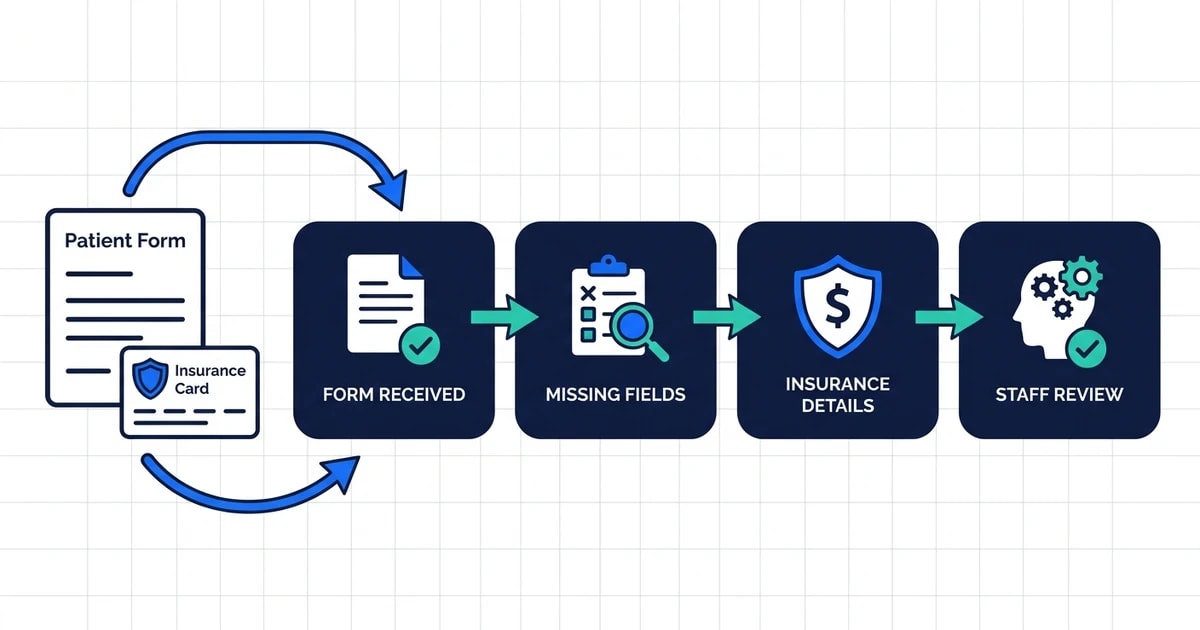
AI document processing is useful here because healthcare intake rarely arrives in one perfect format. Patients upload PDFs, photos, referral notes, prior records, and insurance cards. Staff should not have to read every attachment just to identify what is missing.
A practical intake workflow can:
- Receive the form or document.
- Extract key fields into a structured summary.
- Flag missing insurance, contact, consent, or referral details.
- Send the patient a follow-up request when rules allow.
- Queue the final summary for staff before it touches the record.
That last step matters. In healthcare, speed cannot come at the cost of review. The strongest automation gives staff a cleaner packet, not an unchecked change to clinical data.
Scheduling, Reminders, and After-Hours Patient Communication
Scheduling work is repetitive, urgent, and easy to underestimate. Patients cancel, reschedule, request earlier openings, ask about preparation instructions, or call after hours when staff are gone.
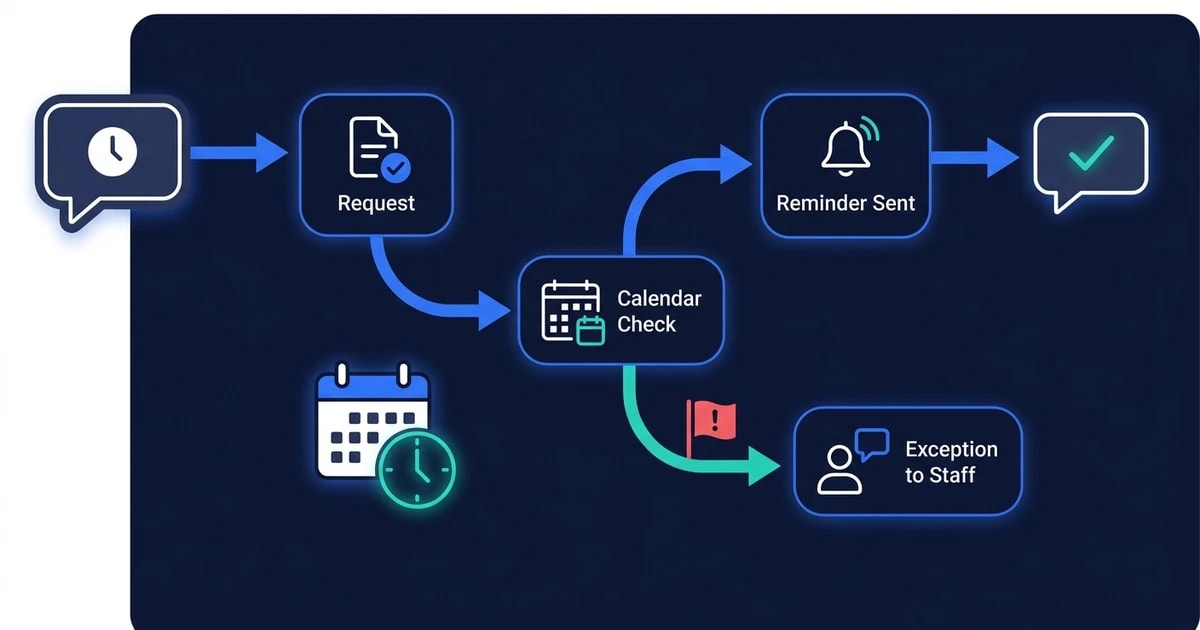
Automation can sort those requests without pretending to be a clinician. It can identify the request type, check defined scheduling rules, send reminders, collect required pre-visit information, and route exceptions to staff.
AI email responder workflows can also help with nonclinical messages. A scheduling message, form reminder, or document request does not need to sit in the same queue as a clinical concern.
Experian Health’s 2026 State of Patient Access survey found that providers named automation at 35% and AI at 28% as non-negotiable for future patient access and revenue-cycle optimization based on its provider and patient survey.
If your practice is still treating every message as a manual inbox item, patient access will stay dependent on staff availability. Automation gives routine requests a path, while exceptions still reach a person.
See how Automiq AI maps patient intake, scheduling, and prior authorization follow-up into one workflow on the AI automation for healthcare solution page.
Prior Authorization and Revenue-Cycle Admin Without Losing Human Review
Prior authorization is a good automation candidate because much of the work is repetitive status tracking, document gathering, and follow-up. The risk is assuming AI should decide whether something is medically appropriate.
It should not. The automation should manage the admin path around the decision: collect required documents, check status, alert staff when a payer responds, draft follow-up tasks, and keep the record updated for review.
The AMA reported that physicians see AI as relevant for billing codes, medical charts, or visit notes at 80%, and for insurance prior authorization automation at 71% in its physician AI coverage.
That demand makes sense. Prior authorization delays create patient frustration and staff workload. A well-scoped workflow cannot remove payer complexity, but it can remove the manual checking and scattered follow-up that make it worse.
Documentation Support Without Handing Clinical Judgment to AI
Documentation support has real value, but it needs a clear role. AI can summarize notes, extract details from patient-provided forms, draft internal task summaries, and prepare nonclinical documentation for review.
It should not silently create clinical conclusions. It should not send advice under a clinician’s name without review. It should not make policy decisions the practice has not approved.
The takeaway is practical: automation can reduce admin, but only when it works inside a clear governance model. If the workflow creates more review work than it removes, the build needs to be narrowed.
HIPAA, Audit Trails, and Safety Guardrails for Healthcare Automation
Healthcare automation needs stricter rules than a normal small-business workflow. Patient data, consent, access, retention, and auditability all matter.
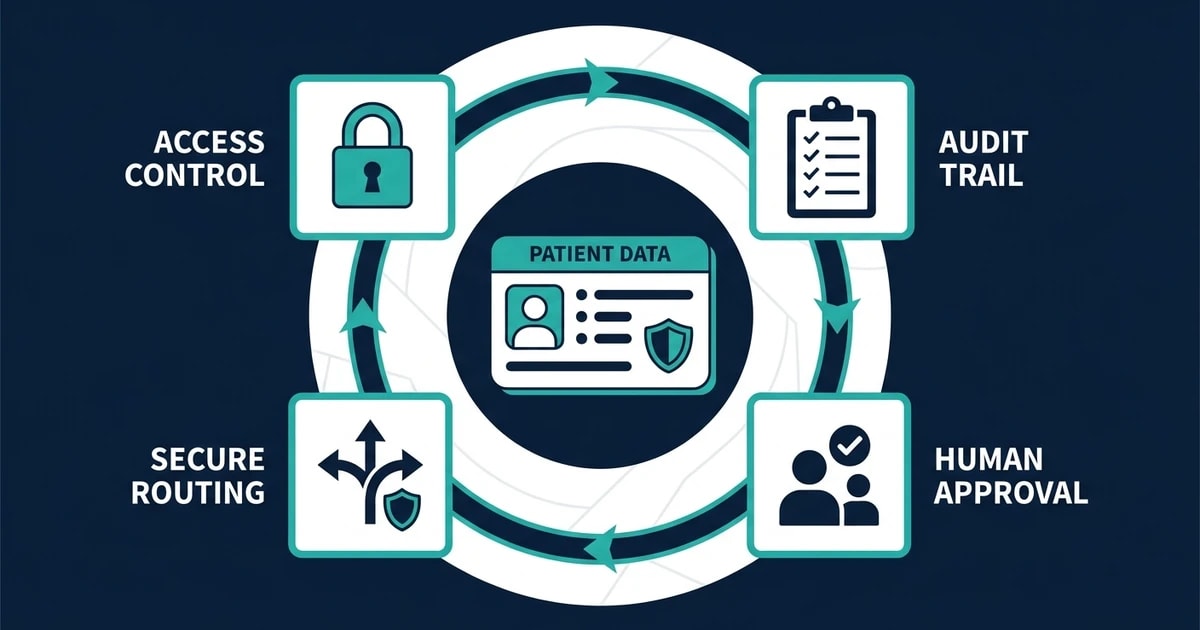
At minimum, your automation plan should define:
- Which data the workflow is allowed to process.
- Which systems it can read from and write to.
- Which messages need staff approval.
- Which exceptions require escalation.
- Who can access logs and outputs.
- How errors get reviewed and corrected.
This is where AI automation mistakes become expensive. A vague workflow that “handles patient messages” is too broad. A workflow that “routes scheduling requests, missing intake fields, and prior authorization status updates to approved queues” is much safer.
Good automation is boring in the right places. It has rules, review points, and logs. That is what makes it usable in a practice setting.
Done-for-You Healthcare Automation vs. Building It Yourself
DIY automation can work for simple reminders or one-step form routing. If a patient fills out a form and your team wants a notification, a basic tool may be enough.
The risk rises when the workflow touches patient communication, insurance information, EHR-adjacent summaries, and multiple systems. At that point, you are not just building an automation. You are designing an operating process.
| Option | Best For | Main Risk |
|---|---|---|
| DIY workflow | Simple reminders or one-step routing | Staff must build, test, and maintain it |
| Software feature | One task inside one platform | It may not connect the full intake-to-follow-up path |
| Done-for-you implementation | Multi-system admin workflows with review points | Requires clear scope and workflow ownership |
AI implementation is the better fit when the workflow needs to connect forms, email, calendar, patient communication, documents, and staff review without forcing your practice manager to become the automation maintainer.
The honest bad fit: if your practice has very low volume, no repeatable admin process, or no one who can own workflow decisions, start with process cleanup before a full build.
What Results to Expect in the First 30 Days
The first 30 days should focus on one workflow with visible workload. Do not automate everything at once.
For a five-provider clinic, the first build might cover intake cleanup and scheduling follow-up:
- New intake forms get checked for missing fields.
- Patients receive approved requests for missing details.
- Staff receive an EHR-ready summary for review.
- Scheduling requests get routed by appointment type.
- Reminder workflows reduce manual calls.
The outcome should be concrete: fewer incomplete intake packets, faster scheduling responses, fewer manual status checks, and cleaner handoffs between front desk, billing, and providers.
That is the right test. If one workflow gives your staff hours back and reduces errors, you can expand into prior authorization follow-up, portal message triage, document processing, or CRM-style patient communication.
Frequently Asked Questions
What is AI automation for healthcare practices?
It is a set of workflows that remove repetitive admin tasks from intake, scheduling, reminders, document handling, prior authorization follow-up, and staff routing. The goal is to help your team move information faster while keeping humans in control of clinical and patient-facing decisions.
Which healthcare workflows should I automate first?
Start with high-volume tasks that have clear rules. Intake cleanup, reminder workflows, scheduling requests, portal message routing, and prior authorization status follow-up are usually better first projects than broad clinical documentation.
Is healthcare AI automation HIPAA compliant?
Compliance depends on the specific tools, data handling rules, access controls, contracts, and workflow design. A healthcare automation build should define what data is processed, who reviews outputs, and where logs are stored before anything goes live.
Can AI send messages to patients automatically?
It can send approved administrative messages, such as reminders or missing-form requests, when the practice has defined the rules. Clinical messages, sensitive issues, and ambiguous patient concerns should route to a human for review.
Should a small practice use done-for-you automation?
Use done-for-you automation when the workflow crosses multiple systems or touches patient communication, insurance details, or EHR-adjacent data. If you only need a simple reminder, DIY may be enough.
Conclusion
Healthcare practices do not need more disconnected AI experiments. They need admin workflows that remove repeat work while protecting patient trust.
The right build starts with one high-volume process: intake, scheduling, prior authorization follow-up, or document handling. It adds structure, review, and routing so staff spend less time chasing information and more time supporting patients.
Book a discovery call with Automiq AI to identify the first healthcare admin workflow we can automate inside your existing tools.