EN
EN DE
DE ES
ES FR
FR NL
NL PT
PT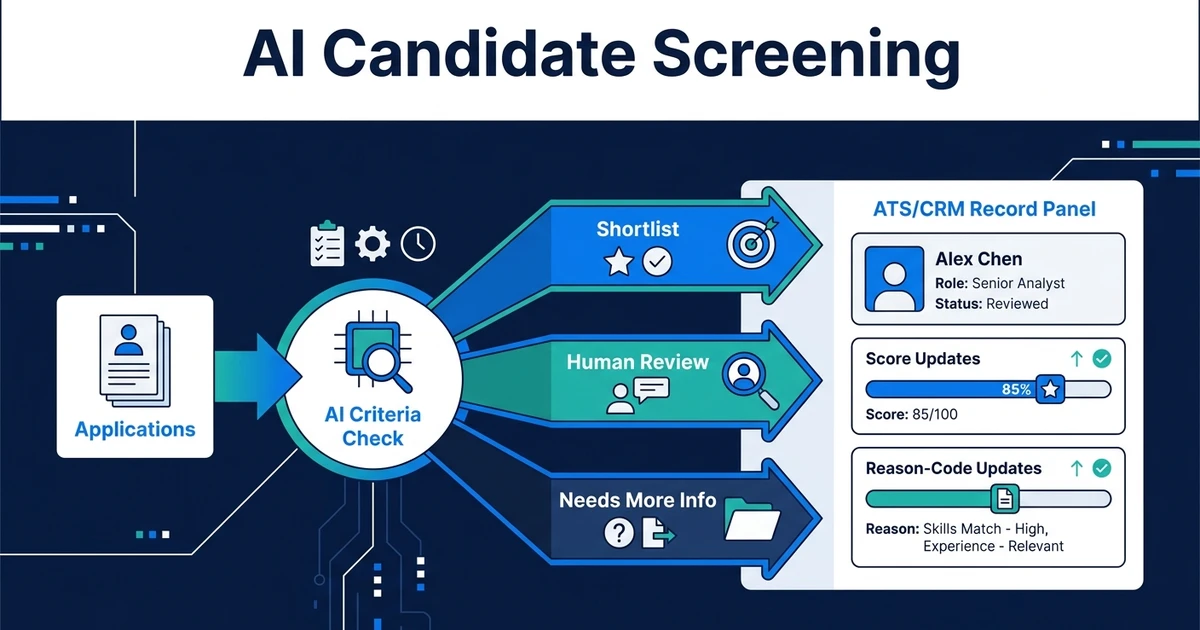
Quick Answer: AI candidate screening scores and ranks applications against your role criteria so recruiters review a structured shortlist instead of every resume. The strongest setups keep humans on final yes or no decisions, log why a candidate scored high or low, and write results back into the ATS or CRM so the rest of hiring can move without re-entry.
AI candidate screening is the first-pass layer that turns application volume into a ranked shortlist. It does not replace recruiter judgment. It removes the hours spent opening every CV to find the same must-haves over and over.
When volume rises, manual triage breaks first. Recruiters skim, miss details, or delay responses. Strong candidates go quiet while weaker applications still sit in the queue.
Automiq AI builds done-for-you screening workflows inside the tools your team already uses. The goal is consistent criteria, explainable shortlists, and clean write-back to your ATS or CRM, not another platform for your desk to learn.
Why AI Candidate Screening Matters When Volume Breaks Manual Triage
Manual screening fails for a simple reason: the work is repetitive, high volume, and low variation. The same license check. The same years of experience. The same location or shift rule. The same tool list.
Each individual review looks quick. Across hundreds of applications, it becomes the largest time sink before anyone reaches a real conversation.
SHRM finds that recruiting is the most common HR practice area for AI use, at 27% of organizations, and that real-world applications concentrate on process-driven tasks such as resume parsing in its 2026 State of AI in HR report. Among HR professionals in organizations using AI, 87% report efficiency gains from those tools.
That matches what high-volume desks feel day to day. Screening is the stage where automation can reclaim hours without handing final hire authority to a model.
A typical agency or in-house TA scenario: one role draws 150 to 300 applications. Without structure, the recruiter opens files in arrival order, notes a few people in a spreadsheet, and loses track of why others were skipped. With structured screening, every application gets the same criteria pass, then humans open the top band and the borderline queue.
How AI Candidate Screening Actually Works
Treat screening as a workflow, not a magic button. The reliable pattern has five steps.
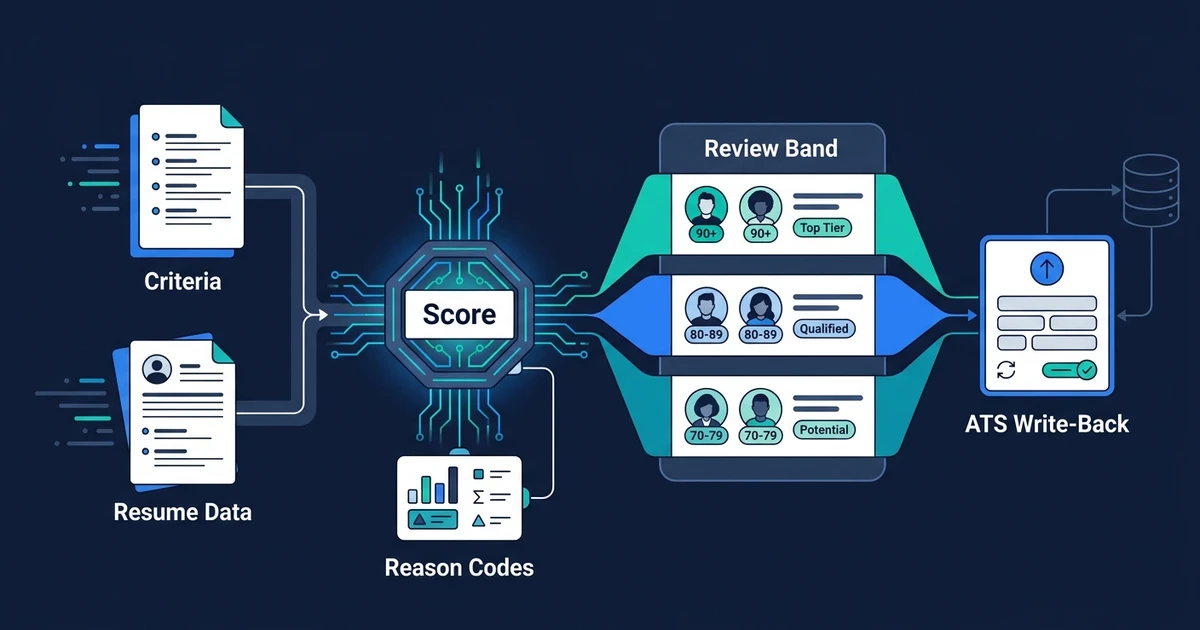
- Define criteria for the role family: must-haves, nice-to-haves, and hard disqualifiers
- Ingest applications from forms, email attachments, or ATS records into a consistent field set
- Score and rank each candidate against those criteria with a short reason for major points
- Band the results into auto-shortlist, human review, and likely reject
- Write back score, stage, and notes to the ATS or CRM so the next stage can start
Must-haves should be verifiable. License present. Years in a role family. Required location or work authorization category. Named tools or certifications when the client truly requires them.
Nice-to-haves should raise rank without auto-rejecting people who lack them. That is how you keep good-fit candidates who missed one optional keyword.
Hard disqualifiers should be rare and explicit. If the rule is fuzzy, do not automate the reject. Route it to review.
Industry research summarized for 2026 hiring trends also shows that resume filtering is one of the most common generative AI uses in talent acquisition, while most hiring managers still say AI is useful but not a substitute for human decision-making in compiled survey data. That is the design standard: AI prepares the shortlist. Humans decide.
What to Automate vs What Humans Should Still Decide
Automate the consistent checks. Keep humans on judgment, risk, and relationship.
Good automation targets:
- Extracting structured fields from resumes and application text
- Checking written must-haves against the role profile
- Ranking candidates into shortlist bands with reason codes
- Flagging missing data and requesting clarification templates
- Updating ATS stage after a recruiter confirms the shortlist
Keep human:
- Final shortlist for client submission or onsite interviews
- Edge cases where experience is adjacent but strong
- Culture, communication, or client-relationship fit
- Sensitive rejections for known candidates or VIP roles
- Any decision that would end a candidacy with no review path
SHRM’s talent acquisition guidance positions screening as a pilot: match skills to requirements and surface a shortlist for people to review, not a fully automated hire decision as described in its 2026 overview. Build that boundary into the workflow from day one.
A practical rule: auto-advance only when confidence is high and the action is reversible, such as moving to “recruiter review.” Never auto-send a final rejection for borderline profiles without a human gate, especially early in rollout.
How Screening Connects to the Rest of Your Recruiting Workflow
Screening only pays off when the shortlist feeds the next stage without retyping.
After a recruiter approves the shortlist band, the workflow should be able to:
- Create interview scheduling tasks or calendar options
- Draft first-touch messages for approved candidates
- Update pipeline stage and owner
- Package a client or hiring-manager shortlist summary
If those steps still start from a spreadsheet export, you fixed triage but left the handoff tax in place.
That is why screening belongs inside a broader recruitment workflow automation design. Screening is one stage. Scheduling, status updates, and follow-up are the stages that convert a shortlist into interviews and offers.
Agency teams can also pair this stage view with the vertical playbook on AI automation for recruitment agencies and the solution page for AI for recruitment agencies.
How a Done-for-You Screening Workflow Is Built
A durable build starts with criteria workshops, not model settings.
Typical sequence:
- Pick one high-volume role family with clear must-haves
- Write the scoring sheet recruiters already use mentally
- Map intake sources (form, email, ATS)
- Define shortlist bands and review owners
- Connect write-back fields so scores and stages land in the right records
- Run a side-by-side pilot for 1–2 weeks against manual shortlists
- Tune thresholds where false rejects or false advances appear
That is the work AI workflow design is for. You get a process map and a build plan before anything goes live.
If applications already overwhelm your desk, book a free automation discovery call. Automiq AI can map one role profile, set shortlist thresholds, and build screening write-back into the stack you already run.
The success metric is concrete: hours spent on first-pass review, time from application to shortlist, and share of shortlisted candidates who advance after human review. If shortlist quality drops, you tighten criteria. If volume is handled but interviews never get booked, you fix the next handoff, not the model.
Done-for-You vs DIY Screening Tools vs Hiring More Screeners
Teams usually weigh three options when screening volume hurts.
| Option | Best fit | Tradeoff |
|---|---|---|
| DIY screening tools | Simple keyword rules and one intake source | You own criteria design, false rejects, and integrations |
| Hire more screeners | Temporary surge capacity with full human judgment | Cost scales with volume and still leaves ATS cleanup |
| Done-for-you AI workflow | Repeated high-volume roles with clear must-haves | Faster path to consistent scoring plus write-back |
DIY can work for a single role with a tiny applicant set. It breaks when sources multiply, criteria differ by client, or results never write cleanly back to the ATS.
Hiring more screeners adds capacity, but it does not fix inconsistent criteria or re-entry work. Two screeners can still disagree on the same resume if the scoring sheet is not explicit.
A done-for-you build is strongest when you already know the pain is first-pass volume, not final decision quality. You keep human review where it matters and stop paying humans to re-check the same license field two hundred times.
How to Evaluate Whether Your Screening Process Is Ready
You are ready to automate screening when you can answer these questions in writing:
- What are the must-haves for this role family?
- What is optional vs disqualifying?
- Which intake sources feed this role?
- Who reviews the borderline band?
- What ATS or CRM fields should receive score and stage?
- What happens after shortlist approval?
- How will you sample false rejects in the first month?
If criteria only live in a senior recruiter’s head, document them first. Automation will mirror the confusion.
If criteria are clear but buried across email threads, centralize them into one scoring sheet, then automate. The sheet is the product. The model is the engine.
Start with one role family. Prove that shortlist quality holds under human review. Expand only after the write-back path is trusted.
Frequently Asked Questions
What is AI candidate screening?
It is automated first-pass ranking of applications against written role criteria, with humans reviewing shortlists and deciding who advances. Good systems also log reasons and update the ATS or CRM.
Will AI candidate screening reject good applicants automatically?
Only if you design it that way. Use must-have rules carefully, keep a human review band for borderline scores, and audit false rejects during the pilot period.
How is AI screening different from keyword resume filters?
Keyword filters match text strings. AI screening can structure resume content, score against criteria, and return ranked candidates with reasons. It still needs human oversight for final fit.
Can AI candidate screening connect to my ATS or CRM?
Yes, and it should. Scores and stage updates need to land in the system of record so scheduling and follow-up do not restart from a spreadsheet.
Where should AI screening sit in the hiring process?
After applications are captured and before deep interviews. Screening prepares the shortlist. Recruiters and hiring managers still own the decision quality after that.
Get a Shortlist That Reflects Your Criteria — Not Just Keywords
Application volume is not the real problem. Unstructured first-pass review is. When every CV is a one-off judgment call, your pipeline slows and your shortlist quality varies by who had time that day.
AI candidate screening fixes the structure: same criteria, ranked bands, human gates, and write-back to the tools you already use. It is one stage of a wider hiring system, and it is usually the right place to start when volume is the bottleneck.
If you want that stage built for you, book a free automation discovery call with Automiq AI. We will define must-haves for one high-volume role, set shortlist thresholds, and connect results to your ATS or CRM so recruiters open the right candidates first.