EN
EN DE
DE ES
ES FR
FR NL
NL PT
PT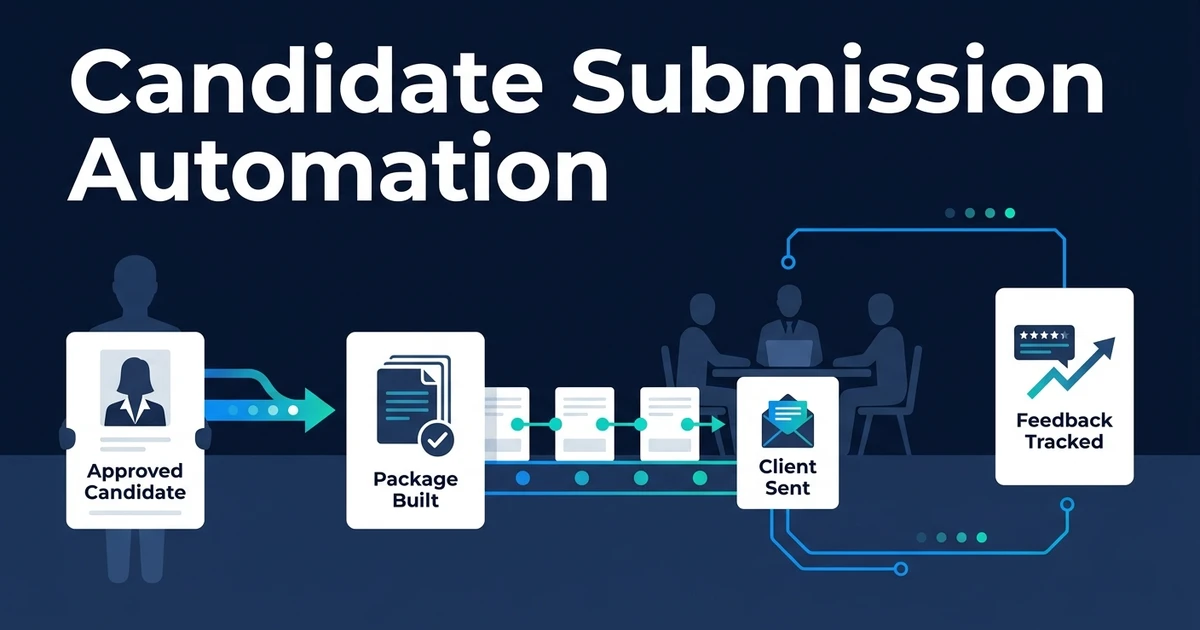
Quick Answer: Candidate submission automation turns a recruiter-approved shortlist into consistent client-ready packages using the correct resume, summary, availability, compensation context, and consent status. It delivers each submission through the approved channel, prevents duplicate sendouts, tracks client decisions, and writes feedback back to the recruitment system while recruiters retain candidate selection and client advice.
Candidate submission automation begins after the recruiter has approved someone for client review. It does not choose the candidate. It makes sure the approved candidate reaches the client in a complete, consistent, trackable package.
Why Manual Candidate Submissions Slow Client Decisions
Manual submissions look simple until each client wants a different format. One wants a formatted profile, another wants a resume plus summary, and another responds through a portal.
Small errors create friction: the wrong resume version, missing availability, weak role evidence, or a duplicate sendout from another recruiter.
LinkedIn reports that the average talent professional can save 20% of the workweek by using generative AI in hiring, leaving more time for relationship-building, reasoning, and human communication, according to its 2025 recruiter guidance. Submission packaging is exactly the kind of admin that should not consume the recruiter’s best attention.
Clients cannot make fast decisions when the package is incomplete or the next step is unclear.
What Is Candidate Submission Automation?
Candidate submission automation is the recruiter-approved shortlist-to-client-review workflow. It assembles the correct candidate documents, drafts or prepares the submission summary, checks consent and duplicates, routes the package for recruiter approval, delivers it, captures feedback, and updates the ATS or CRM.
It is not candidate matching. It begins only after a recruiter decides the candidate is ready for client submission.
It is not generic email automation either. Delivery is only one step. The workflow also manages document choice, client format, consent, duplicate checks, feedback structure, and status write-back.
How Does an Automated Candidate Submission Workflow Work?
A controlled submission workflow usually runs like this:
- A recruiter approves the candidate for submission.
- The workflow validates required candidate, role, client, and consent data.
- The correct resume version and supporting documents are selected.
- A role-relevant summary is drafted from approved data.
- Duplicate submission checks run against client and role history.
- The recruiter approves or edits the final package.
- The client receives the package through the approved channel.
- Client feedback is captured as a structured outcome.
- The ATS or CRM updates status, owner, and next action.
The approval gate is essential. Automation can assemble the package, but the recruiter owns the client recommendation and final send.
Exception routes should be visible. Missing consent, conflicting salary expectations, no approved resume, or possible duplicate submission should stop the workflow until a person resolves it.
What Should a Client-Ready Candidate Submission Include?
A strong submission package gives the client enough context to decide the next step without exposing unnecessary personal data.
It usually includes:
- The approved resume or candidate profile
- A concise role-relevant summary
- Evidence linked to the client’s requirements
- Notice period or availability
- Compensation expectations where appropriate
- Location and work model context
- Work authorization where appropriate
- Candidate consent status
- Recruiter recommendation and next step
The summary should explain why this candidate is being submitted for this role without inventing achievements or overstating evidence.
For package generation and resume-version control, automate candidate document preparation before the client-facing step runs.
How Should Approval, Consent, and Duplicate Controls Work?
Candidate submissions need controls because they are client-facing. The workflow should require recruiter approval before send, check consent, apply client-specific templates, and prevent duplicates where possible.
Duplicate checks should compare candidate, role, client, owner, and recent submission history. A potential duplicate should route to the recruiter or account manager rather than silently blocking a legitimate case.
If a recruiter edits the summary, changes the resume version, or updates compensation context, the workflow should store what changed before delivery. Automation prepares the package, but the recruiter decides what story the client needs to hear.
How Should Client Feedback Return to the Recruitment Workflow?
Feedback should not disappear into email. The workflow should capture structured outcomes such as proceed to interview, hold, reject, request more information, or needs follow-up.
It should also record the source, client contact, timestamp, and next owner. A rejection reason may create a candidate communication task, while an interview request may hand off to scheduling.
Do not turn every client reply into an automatic next step. Ambiguous feedback needs a human owner, especially when it affects candidate communication or commercial advice.
If your agency wants candidate data, documents, recruiter sign-off, client delivery, and feedback tracking connected, Automiq AI can build done-for-you candidate submission automation inside your current ATS, CRM, email, and document stack.
Is Automiq AI Right for My Recruitment Agency?
Automiq AI is a fit when your agency already has a submission process but too much admin sits around it. You know which candidates to submit, but package assembly, duplicate checks, delivery, and feedback tracking slow the client review cycle.
It may not be necessary if your ATS submission module already handles the full process. Native functionality is enough when the profile, delivery, approvals, feedback, and reporting all live cleanly in one place.
Cross-tool implementation adds value when recruiters use several systems, client formats vary, documents need preparation, or feedback returns through mixed channels.
Done-for-You vs DIY Submission Automation vs Manual Packaging
The implementation choice depends on package complexity and client expectations.
| Approach | Best fit | Main tradeoff |
|---|---|---|
| Manual packaging | Low volume and highly tailored client work | Recruiter time carries every step |
| DIY submission automation | Simple templates and one delivery channel | Your team owns document logic and exceptions |
| Done-for-you workflow | Multiple clients, formats, approvals, and feedback paths | Requires clear package and consent rules |
Manual packaging gives control, but it does not scale well across busy desks. DIY can work when each package follows the same format and feedback comes back through one route.
Done-for-you implementation fits when submissions span ATS records, resumes, formatted profiles, client portals, inboxes, and CRM reporting.
For the wider business case, see automation opportunities for recruitment agencies.
What Does Candidate Submission Automation Look Like in Practice?
Picture an agency where recruiters submit approved candidates to several clients with different profile formats and feedback habits.
In the manual process, recruiters prepare each package from scratch, check old emails for prior submissions, and wait for feedback without a clean status trail.
In the automated process, recruiter approval triggers document selection, summary drafting, consent checks, duplicate review, client-specific formatting, delivery, and feedback capture.
The recruiter still advises the client. The workflow removes the packaging and tracking work that gets between a good candidate and a timely review.
Frequently Asked Questions
What is candidate submission automation?
It turns a recruiter-approved candidate into a client-ready package with the right documents, context, consent, approval, delivery, and feedback tracking. It starts after candidate selection, not before.
Can automation write candidate submission summaries?
Yes. It can draft summaries from approved candidate data, role requirements, and recruiter notes. The recruiter should review the summary before it reaches the client.
How does the workflow prevent duplicate submissions?
It checks candidate, client, role, owner, and submission history before delivery. Possible duplicates should route to the recruiter or account manager for review.
Can clients approve candidates through a portal or email?
Yes. The workflow can capture clear portal outcomes or approved email replies and update the ATS or CRM. Ambiguous replies should create a follow-up task.
Does candidate submission automation replace recruiter review?
No. Recruiters still decide who to submit, how to position the candidate, and how to advise the client. Automation handles packaging, delivery, tracking, and write-back.
Send Better Candidate Packages Without Adding Admin
Client-ready submissions should be complete, consistent, and easy to act on. They should not require recruiters to rebuild the same package for every client and then chase feedback manually.
LinkedIn reported that 54% of recruitment professionals said quality of hire would shape recruiting over the following five years, and 91% said agility was a priority, according to its 2024 Future of Recruitment research. Better submissions help agencies move quickly while still presenting evidence clearly.
Gartner found that only 24% of surveyed HR employees believed their function derived maximum technology value, according to its 2024 HR technology survey. The goal is not another disconnected tool. It is a workflow that gets approved candidates to clients and brings decisions back into the system.
Book a recruitment automation discovery call for a candidate submission workflow built around your current ATS, CRM, email, and document stack. Automiq AI will map the package rules, consent checks, delivery routes, and feedback write-back needed to move client review faster.