EN
EN DE
DE ES
ES FR
FR NL
NL PT
PT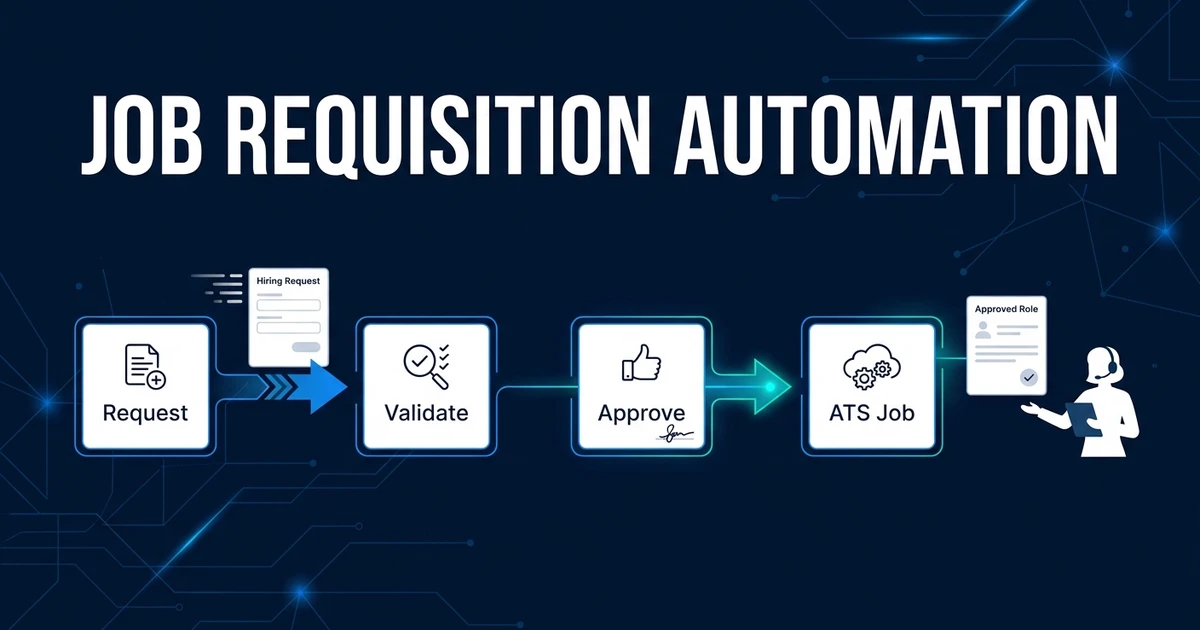
Quick Answer: Job requisition automation converts a hiring request into a validated, approved role before recruiters start sourcing. It collects required details, routes approvals, returns incomplete requests for clarification, assigns ownership, and creates the approved job in the ATS while keeping hiring priorities and exceptions under human control.
Job requisition automation fixes the messy handoff before recruiting work begins. Instead of starting with an email, chat message, or half-filled job order, recruiters receive an approved role with the fields, budget context, owner, and next step already defined.
That matters because requisition quality sets the ceiling for every downstream stage. If the request is unclear, sourcing starts with guesswork and the team spends the rest of the search repairing avoidable ambiguity.
Why Incomplete Hiring Requests Delay Every Downstream Recruitment Step
Most requisition problems are not dramatic. They are missing salary ranges, unclear location rules, vague must-have skills, absent approvers, or target dates that no one has accepted.
The recruiter then has to chase the hiring manager before they can write a search brief, open the role, or set expectations with candidates. Each clarification loop adds friction before the actual recruiting work has begun.
LinkedIn reported an average time to fill of 66 days and recommends role clarity across executives, hiring managers, and recruiters as part of reducing that cycle, according to its 2025 time-to-fill guidance. Requisition intake is not the whole delay, but it is one of the first places confusion can enter the system.
Clean intake also protects the wider recruitment workflow. Screening, scheduling, feedback, and offers all depend on a role that was approved with the right constraints.
What Is Job Requisition Automation?
Job requisition automation is a connected intake and approval workflow for new hiring requests. It validates required information, routes the request to the right approvers, returns incomplete submissions for clarification, and creates the approved job record in the ATS.
A form alone is not enough. A form captures answers. A workflow checks whether the answers are usable, decides who must approve them, tracks revisions, applies escalation rules, and updates the system of record.
The goal is not to let automation decide whether a company should hire. The goal is to make sure no recruiter starts sourcing from an unapproved or unusable request.
How Does an Automated Job Requisition Workflow Work?
A controlled requisition workflow usually follows this path:
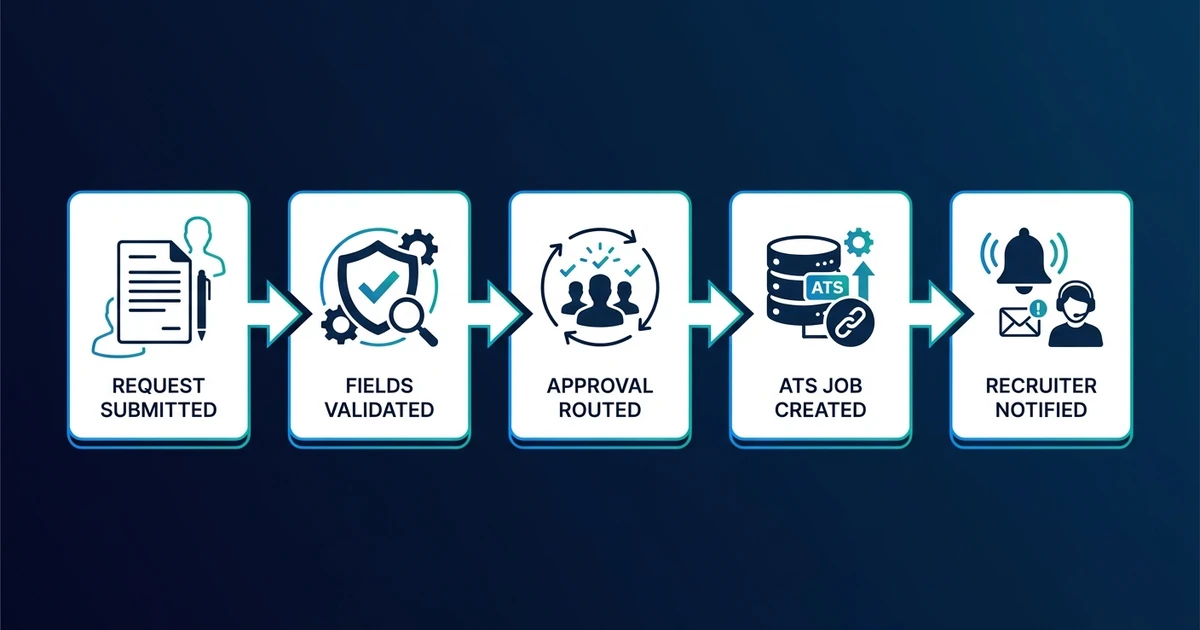
- The hiring manager or client submits a request through an approved intake form.
- The workflow validates required fields and conditional fields.
- Missing or conflicting information returns to the requester with a clear correction task.
- The request routes to the right approver based on department, budget, location, or headcount type.
- Rejections and revision notes return to the requester with context.
- Approved requisitions receive an owner, priority, target date, and ATS job record.
- Stakeholders receive confirmation and the recruiter receives the approved brief.
Every step needs a failure path. If the budget owner is missing, the request should stop. If compensation exceeds a threshold, it should route to an additional approver. If a confidential replacement role uses restricted access, the ATS record should reflect that before sourcing begins.
The useful output is simple: an approved role that a recruiter can act on without reconstructing the request from messages.
Which Requisition Fields Should Be Required Before Approval?
Required fields should reflect what recruiters need to start a search responsibly. Common fields include role title, purpose, must-have skills, compensation range, employment type, location, work model, headcount reason, target start date, budget owner, hiring manager, interview team, and compliance requirements.
Some fields should be conditional. A remote role may need country eligibility rules. A replacement role may need confidentiality settings. A contract role may need end date, rate, and renewal terms.
Do not make every field mandatory. A bloated form encourages rushed or inaccurate answers. The better pattern is a core set of required fields plus conditional logic that appears only when relevant.
The workflow should also distinguish facts from preferences. A required certification is different from a nice-to-have tool. A budget-approved compensation range is different from a hiring manager’s wish list.
How Should Requisition Approvals and Clarification Loops Work?
Approval routing should follow the actual governance of the business. A simple replacement role might require one hiring-manager confirmation, while new headcount may need department, finance, and HR approval.
Clarification loops should be explicit. When a request fails validation, the requester should see which field is missing, why it matters, and who can answer it. The workflow should not bury the request in a generic “needs review” status.
Gartner found that only 24% of surveyed HR employees said their function derived maximum value from HR technology, while 35% of HR leaders were confident their HR technology approach supported business objectives, according to its 2024 HR technology survey. Approval workflows create value only when the routing reflects real business ownership.
If your team wants required fields, routing rules, and ATS job creation mapped inside its current tools, Automiq AI can build a done-for-you recruitment workflow implementation that keeps approval decisions human while removing the coordination work.
What Should Stay Under Recruiter and Hiring-Manager Control?
Automation should block incomplete work, not invent missing requirements. If the hiring manager has not defined compensation, the workflow should ask for it or route the request to the budget owner.
Keep these decisions with people:
- Whether the role should exist at all
- Whether the business priority justifies sourcing now
- How to handle unrealistic must-have criteria
- Whether a compensation exception is acceptable
- How to manage confidential replacement roles
- Whether to override a blocked request
The workflow can show missing fields, conflicting values, and overdue approvals. Recruiters and hiring leaders still own the judgment behind the role.
What Does Job Requisition Automation Look Like in Practice?
Consider a talent team that receives hiring requests through email, chat, spreadsheets, and calls. Some requests include budget approval. Others include only a role title and a sentence about needing someone soon.
In the manual version, recruiters triage every request differently. They ask follow-up questions, wait for missing details, and sometimes begin sourcing before finance or the hiring manager has confirmed the scope.
In the automated version, every request enters the same intake workflow. Required details are captured first, conditional approvals run next, and the ATS job record is created only when the request is usable.
The recruiter begins with an approved role, not a detective assignment. That single change reduces rework across intake, search planning, and stakeholder communication.
Done-for-You vs DIY Requisition Automation vs Manual Intake
The right setup depends on approval complexity and how many systems need to stay current.
| Approach | Best fit | Main tradeoff |
|---|---|---|
| Manual intake | Low volume and informal hiring | Recruiters chase missing details and approvals |
| DIY form and notifications | One team, simple fields, and one approver | Your team owns branching logic and ATS write-back |
| Done-for-you workflow | Multiple requesters, approvers, exceptions, and ATS creation | Requires clear rules before implementation |
A simple form can work when requests are rare and one person approves them. It becomes fragile when compensation thresholds, confidential roles, client requirements, and ATS fields vary by role.
Done-for-you implementation fits when the workflow must connect intake, approvals, reminders, owner assignment, and ATS creation. The build is not just a form. It is an operating system for turning requests into approved roles.
For upstream process design, start by mapping requisition rules before implementation so the automation reflects how your team actually hires.
How Do You Evaluate a Job Requisition Automation Setup?
Evaluate the workflow by the quality of approved roles, not the number of forms submitted. Track completion rate, clarification cycles, approval turnaround, unapproved sourcing starts, ATS field accuracy, exception rate, and ownership clarity.
Pilot one role family first. Test a normal request, a missing salary range, a new headcount request, a confidential replacement, a rejected approval, and a revised request.
LinkedIn found that 91% of recruitment professionals said they were focused on agility to adapt to hiring needs, according to its 2024 Future of Recruitment research. A requisition workflow should support agility by making changes visible and approved, not by letting uncontrolled work slip through.
Roll back or pause automation if approval data becomes less trustworthy. A slower but accurate requisition process beats a fast workflow that creates bad ATS records.
Frequently Asked Questions
What is job requisition automation?
It is a workflow that turns a hiring request into a validated and approved role before recruiters start sourcing. It collects required fields, routes approval, requests clarification, and creates or updates the ATS job record.
Can a requisition workflow create jobs in an existing ATS?
Yes. Once required details and approvals are complete, the workflow can create the job record, assign the owner, and attach approval history. Failed or incomplete records should route to a human rather than publish silently.
Which hiring requests should require extra approval?
New headcount, compensation exceptions, confidential replacements, nonstandard employment terms, and roles outside budget usually need extra approval. Your policy should define the threshold before the workflow goes live.
Can automation reject an incomplete requisition?
It can block the request from moving forward and return it with missing fields or conflicts listed. A human should still review unusual requests that do not fit a clean rule.
What should remain manual in requisition approval?
Role priority, budget tradeoffs, compensation exceptions, confidential-role handling, and requirement negotiation should remain human-led. Automation should enforce the process around those decisions.
Start Every Search With an Approved, Usable Requisition
Recruiters should not begin a search by untangling an incomplete request. They should begin with a role that has the right fields, approvals, owner, and ATS record.
The best requisition workflows are strict about data and flexible about exceptions. They stop incomplete work early while giving recruiters and hiring managers the context needed to make real decisions.
Book a requisition workflow discovery call to turn emailed hiring requests into controlled approved-role workflows. Automiq AI will map the fields, approval rules, exception paths, and ATS creation steps your team needs before sourcing starts.