EN
EN DE
DE ES
ES FR
FR NL
NL PT
PT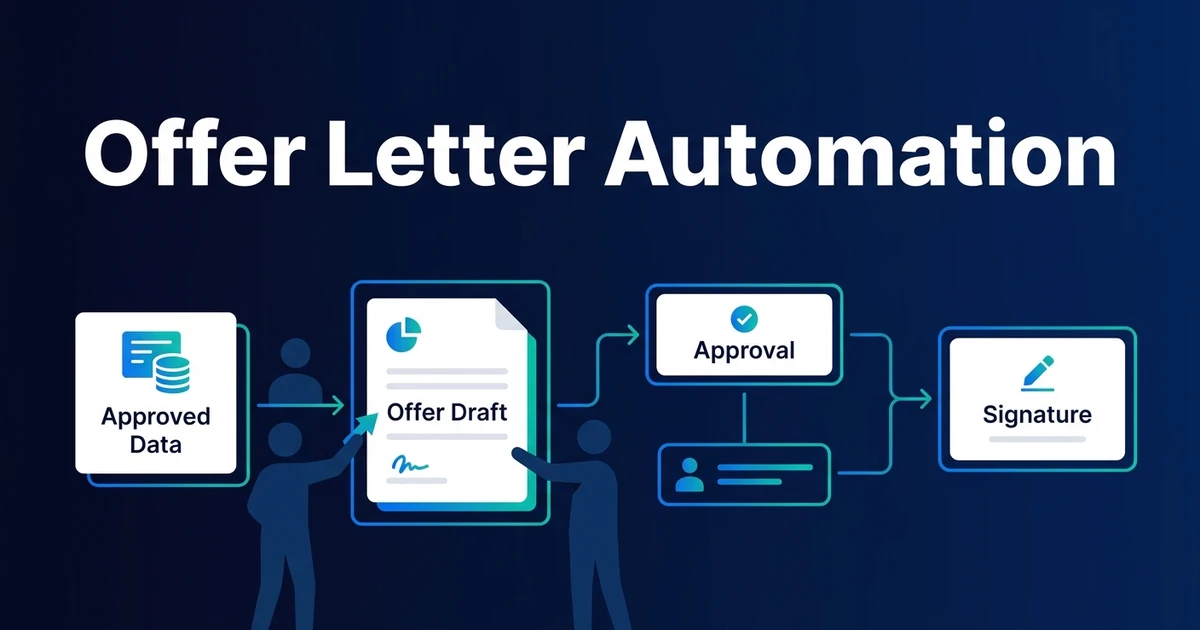
Quick Answer: Offer letter automation pulls approved candidate and role data into a controlled template, routes the draft through the required approvers, sends the approved document for signature, follows up before expiry, and updates the ATS when its status changes. Compensation exceptions, negotiation, clause approval, and final release remain under human control.
Offer letter automation starts after the hiring decision. It reduces the manual work between “we want to hire this person” and “the approved offer is signed and recorded.”
The workflow is not compensation strategy, legal drafting, or recruiter-led negotiation. It is the controlled movement of approved data, documents, approvals, signatures, reminders, and ATS status updates.
Why Offer Letters Still Get Delayed After a Hiring Decision
Offer delays usually come from preventable handoffs. Someone retypes candidate details, pulls an old template, waits for compensation approval, misses the sign-off order, or forgets to update the ATS after signature.
The candidate experiences delay even though the team has already made a decision. Internally, the recruiter is chasing approvals and documents instead of managing the relationship.
LinkedIn says 61% of candidates receive an offer within one week of the final interview and recommends a smooth offer process after selection, according to its 2025 time-to-fill guidance. Automation can support that speed only when the approved data and approval gates are reliable.
Speed without control creates risk. A fast offer with the wrong salary, clause, or start date is worse than a slower offer reviewed properly.
What Is Offer Letter Automation?
Offer letter automation is a governed workflow that generates a draft from approved data, applies the right template and clauses, routes it through required approvals, sends it for e-signature, and records the final status.
Document generation is only one part. The workflow also needs validation, version control, expiry rules, revision paths, duplicate-send prevention, and ATS write-back.
The trigger should be explicit: an approved selection event, offer approval stage, or recruiter action. The workflow should not create or send an offer just because a candidate reached a vague status.
Done well, the process gives recruiters a controlled way to move offers faster without asking them to manually assemble every document.
How Does an Automated Offer Letter Workflow Work?
A controlled offer workflow usually follows this sequence:
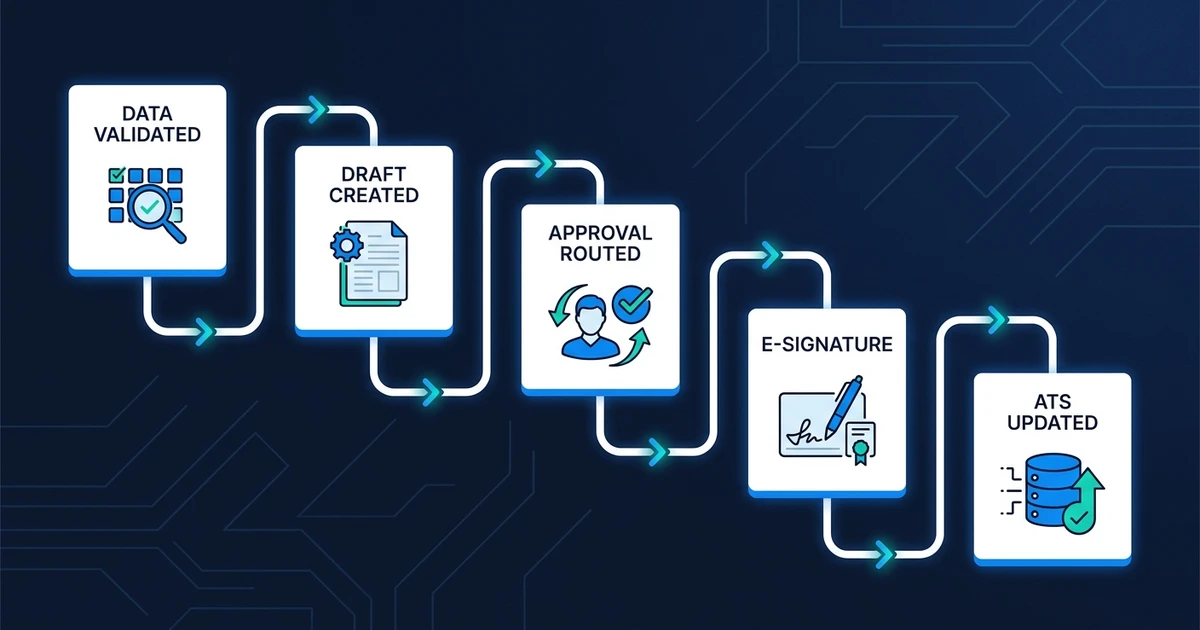
- The candidate is approved for offer creation.
- Required ATS and role fields are validated.
- The workflow selects the correct template and approved clauses.
- A draft offer is generated with version history.
- Required approvers review the draft in order or in parallel.
- Rejections and revision notes return to the owner.
- The approved document is sent through the e-signature tool.
- Expiry reminders run before the deadline.
- Signed, declined, withdrawn, or expired status writes back to the ATS.
Every branch should have an owner. Missing compensation should stop the draft. A rejected approval should return to the recruiter with the reason. A declined offer should trigger the right follow-up task.
The workflow should also preserve the signed document and final status in the correct record. Otherwise, the recruiter still has to reconcile the ATS, inbox, and document storage manually.
Which Offer Data and Clauses Can Be Automated Safely?
Automation is safest when it uses approved inputs. Candidate name, role title, manager, location, start date, employment type, approved compensation, standard benefits language, and pre-approved clauses can all flow into the document.
Conditional clauses can be automated when the conditions are clear. For example, a relocation clause may appear only when the approved location field requires it. A probation clause may depend on employment type and jurisdiction.
Nonstandard compensation, custom legal wording, unusual bonus terms, and role-specific exceptions should route for approval. The workflow can prepare the draft, but the exception owner decides whether the clause belongs.
For document-heavy workflows, automated document data and template workflows can support the extraction, mapping, and controlled population of approved fields.
How Should Multi-Step Offer Approvals Work?
Approval routing should match the risk of the offer. A standard offer may need recruiter and HR approval. An offer above a compensation threshold may add finance, legal, or an executive approver.
Use conditional rules rather than a single long approval chain for every offer. Otherwise, standard offers become slow and exception offers still lack the right owner.
Version control is essential. If compensation changes after an approval, the workflow should create a new version and reroute to the relevant approver. The old draft should not remain available for signature.
The final rule is non-negotiable: no document should be sent before all required approvals are complete.
How Should E-Signature, Expiry, and Revisions Be Handled?
E-signature should happen only after final approval. The workflow should send the document through the approved signing tool, confirm signer identity according to your policy, and store completion status back in the ATS.
Expiry rules should be clear. The workflow can remind the candidate before expiry, alert the recruiter when the deadline approaches, and mark the offer as expired if no signature arrives.
Revisions need a controlled path. If the candidate negotiates or asks for a change, the recruiter should own the conversation. Once a change is approved, the workflow can generate a revised version and prevent the old one from being signed.
Gartner found that 69% of more than 1,200 surveyed employees experienced at least one HR technology interaction barrier, according to its 2024 HR technology survey. Candidate-facing offer delivery should be tested carefully because a broken signature path is highly visible.
If you want approved ATS data, templates, approvers, and e-signature tools connected, Automiq AI can build done-for-you offer workflow automation while keeping compensation and release decisions human-owned.
What Does Offer Letter Automation Look Like in Practice?
Imagine a growing company where standard offers need recruiter and HR approval, while compensation exceptions add finance review. Today, the recruiter copies data into a template, emails approvers, tracks comments, sends a PDF, and updates the ATS later.
In the automated version, the approved candidate stage triggers data validation. The workflow chooses the template, inserts approved details, routes the draft based on compensation threshold, and sends the final version for signature.
If finance rejects the compensation, the draft returns to the recruiter with the reason. If the candidate requests a change, the workflow records a revision path instead of letting several document versions circulate by email.
The recruiter stays in the relationship. The workflow handles the document and status machinery around that relationship.
Done-for-You vs DIY Templates vs Manual Offer Preparation
The right approach depends on how many approvals, templates, and exception paths your team manages.
| Approach | Best fit | Main tradeoff |
|---|---|---|
| Manual preparation | Rare offers or highly bespoke terms | Recruiters own every copy, approval, and status update |
| DIY templates | One approved template and simple routing | Your team owns validation, versioning, and failures |
| Done-for-you workflow | Multiple templates, thresholds, signatures, and ATS write-back | Requires approved offer rules before launch |
One template and one approver may not justify a complex build. A lightweight document process can be enough.
Automation becomes more valuable when offers vary by location, employment type, compensation threshold, client, or approver. That is where manual template work creates risk.
A done-for-you workflow fits when the process must connect the ATS, documents, approvals, e-signature, storage, reminders, and status reporting.
How Do You Evaluate an Offer Letter Automation Setup?
Evaluate accuracy and control first. Track draft accuracy, approval turnaround, revision rate, time from decision to send, signature completion, expired offers, duplicate sends, and ATS accuracy.
Test a standard offer, missing compensation, rejected approval, revised compensation, expired offer, declined offer, and duplicate-send attempt. The workflow should handle each path without exposing the wrong document.
LinkedIn notes that high performers often consider the quality of the hiring experience and the relationships built during the process, according to its 2024 candidate experience guidance. Offer automation should protect the relationship by reducing admin, not replacing personal communication.
If recruiters repeatedly bypass the workflow, find the friction. The process may be missing an exception path, approval rule, or field that matters in real offers.
Frequently Asked Questions
What is offer letter automation?
It is a controlled workflow that creates an offer from approved data, routes it for approval, sends it for signature, and updates the ATS. Human owners still manage compensation, clauses, negotiation, and final release.
Can an offer letter be generated from ATS data?
Yes. Approved ATS fields can populate the candidate, role, compensation, start date, and employment details. The workflow should validate required fields before generating the draft.
Can automation route offers to multiple approvers?
Yes. Routing can depend on thresholds, departments, locations, employment type, or clause selection. The offer should not be released until every required approval is complete.
Can candidates negotiate through an automated workflow?
Negotiation should remain human-led. The workflow can record requests, create revision tasks, generate a new approved version, and prevent the old document from being signed.
What happens when an offer expires or is rejected?
The workflow can send reminders, mark the offer as expired or declined, alert the recruiter, and update the ATS. It should preserve the offer history for review.
Move Approved Offers to Signature Without Losing Control
Offer automation works when it respects the line between repeatable document movement and human decision-making. Use automation for approved data, templates, routing, reminders, signatures, revisions, and ATS updates.
Keep compensation, legal exceptions, negotiation, and final release with the people accountable for them. That gives candidates a faster process without turning the offer into an uncontrolled document generator.
Book a discovery call to map your approval-to-signature workflow. Automiq AI will help define templates, thresholds, approval paths, revision logic, and ATS updates so approved offers move faster without losing control.