EN
EN DE
DE ES
ES FR
FR NL
NL PT
PT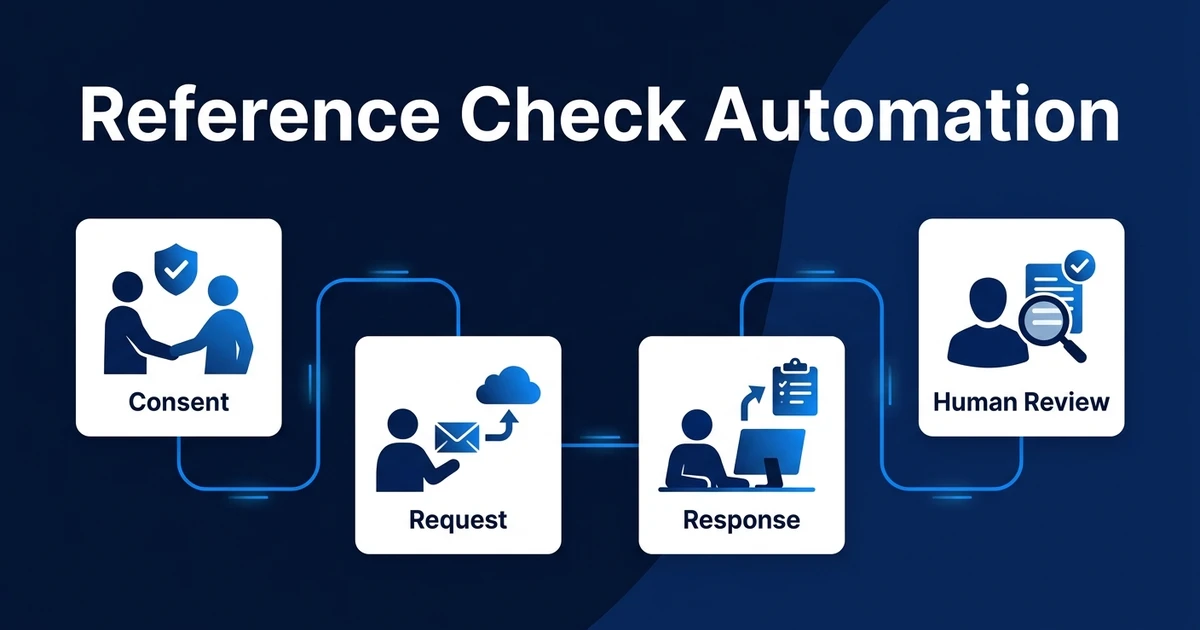
Quick Answer: Reference check automation collects candidate consent and referee details, sends standardized requests, follows up on incomplete responses, flags inconsistencies, and prepares completed references for human review. It removes coordination work while recruiters retain verification, interpretation, and every employment decision.
Reference check automation is useful when your team already knows which checks are allowed and what needs to be reviewed. It handles the repetitive movement of forms, reminders, and logs while keeping judgment with recruiters and HR.
This is not background screening and it is not legal advice. It is a controlled workflow for collecting employment references consistently.
Why Reference Checks Stall After the Final Interview
Reference checks often stall for small operational reasons. Candidate consent is missing, referee details are incomplete, questions differ by recruiter, emails are ignored, and no one is sure who owns the final review.
Manual tracking makes the problem worse. A spreadsheet may show a request was sent, but the ATS may not show whether the referee replied, whether a reminder went out, or whether an exception needs review.
Late-stage delay also affects candidate trust. LinkedIn reported an average time to fill of 66 days and said 52% of candidates would refuse an otherwise attractive offer after a negative recruitment experience, according to its 2025 time-to-fill guidance.
The purpose of automation is not to rush judgment. It is to remove preventable coordination delay after the candidate has already reached a sensitive stage.
What Is Reference Check Automation?
Reference check automation is the workflow that manages consent, referee detail collection, request delivery, reminders, response capture, validation, exception flags, reviewer handoff, and ATS logging.
It starts after your process defines when references are requested. It ends when a human reviewer has the completed responses, flags, and source history needed to make the next process decision.
It should not conduct criminal background checks, decide right-to-work status, or automatically reject a candidate. Those are different processes with different legal and operational requirements.
The workflow is coordination plus control. Recruiters stop chasing every response manually, but they still own interpretation and candidate communication.
How Does an Automated Reference Check Workflow Work?
A controlled workflow usually follows this path:
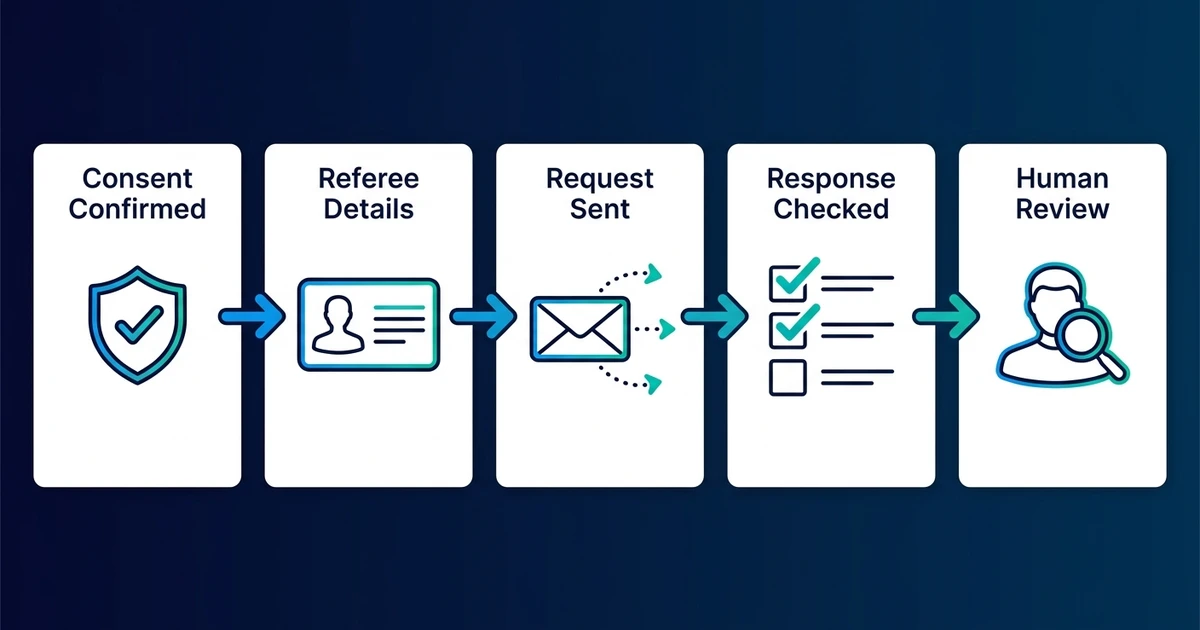
- The candidate reaches the approved reference-check stage.
- The workflow confirms consent and permitted timing.
- Candidate-provided referee details are collected or validated.
- Standardized requests are sent through the approved channel.
- Reminders run until a response, refusal, bounce, or timeout occurs.
- Responses are captured in a structured form or secure record.
- Missing fields and suspicious signals are flagged.
- A reviewer receives the completed package.
- The ATS records status, source, and reviewer outcome.
The UK Government describes a process where reference requests can be emailed automatically at the correct stage, reminders reissued, responses tracked, and a human reviewer records the outcome, according to its current pre-employment checks guidance.
Use that as a process example, not a universal policy. Your exact workflow should match your location, role type, and legal advice.
What Information Should a Reference Workflow Collect?
Collect only information that has a clear purpose. Typical fields include referee identity, relationship to the candidate, organization, employment dates, role or position, relevant duties, and factual responses to approved role-related questions.
Where lawful and appropriate, the workflow may ask about eligibility for rehire or specific role-related conduct. Opinion-heavy questions should be handled carefully because they can introduce unclear or unfair interpretation.
Data minimization matters. Do not collect sensitive personal details merely because a form makes it easy. Keep the questions tied to the role and the permitted purpose.
The workflow should also preserve source context. A reviewer needs to know who responded, when they responded, which candidate and role the response concerns, and whether anything failed validation.
How Should Consent, Privacy, and Access Controls Work?
Consent should be a workflow gate, not a note hidden in an email. If consent is missing, expired, or unclear, the request should not go out automatically.
Access should follow role and need. A coordinator may need to see status, while a reviewer may need to see full responses. Wider hiring teams may not need access to detailed reference content.
Retention rules should be configured before launch. The workflow should know where the response is stored, who can see it, how long it remains, and what happens if deletion is required.
Reference questions and contact timing can vary by jurisdiction and role. The automation should enforce your approved rules, not define them.
How Can Automation Detect Incomplete or Suspicious Responses?
Automation can catch operational red flags without making accusations. It can flag missing fields, bounced emails, mismatched organization details, duplicate technical signals, inconsistent employment dates, or contact domains that need verification.
The key is routing. A flag should create a human review task with the evidence attached. It should not label the candidate as dishonest or automatically stop the process.
The UK National Protective Security Authority recommends factual verification, prior permission before contacting a current employer, reasonable authenticity checks, and standardized reference forms to reduce referee effort and encourage timely responses, according to its 2023 employment screening guide.
If you want secure forms, reminders, exception flags, and ATS logging connected while review stays human, Automiq AI can build a done-for-you reference-check workflow around your current recruitment stack.
What Does Reference Check Automation Look Like in Practice?
Imagine a recruiter checking references for several late-stage candidates each week. In the manual process, they request consent, chase referee details, send emails, track replies in a spreadsheet, copy responses, and remind referees one by one.
That process is easy to lose track of when an offer is close. A missed reminder or unclear status can leave the recruiter guessing whether the check is delayed, incomplete, or ready for review.
In the automated version, the candidate reaches the approved stage, consent is confirmed, standardized requests go out, reminders run on the agreed cadence, and complete responses appear in a review queue.
The reviewer still reads the response and decides what it means. Automation just removes the administrative fog around getting the response in the first place.
Done-for-You vs DIY Forms vs Manual Reference Checks
The right path depends on volume, sensitivity, and data controls.
| Approach | Best fit | Main tradeoff |
|---|---|---|
| Manual checks | Low volume or highly sensitive roles | Status and reminders depend on individual follow-up |
| DIY secure forms | Simple questions and clear review ownership | Your team owns consent, reminders, access, and logging |
| Done-for-you workflow | Multi-step checks, ATS write-back, and exception rules | Requires privacy and review policies before build |
A secure form can suit low-volume hiring if a person still owns reminders and review. It becomes harder when your team needs consistent reminders, audit history, and ATS visibility.
DIY forms often miss the process around the form. Who confirms consent? Who sees responses? What happens after no reply? How are exceptions logged?
Done-for-you implementation fits when the reference workflow must behave like a controlled process across forms, email, ATS records, reviewer tasks, and retention rules.
For planning the policy and exception paths first, see how to design privacy and exception rules before implementation.
How Do You Evaluate a Reference Check Automation Setup?
Measure reliability and control. Track completion rate, time to first response, reminders per check, bounced-request rate, exception rate, reviewer turnaround, access incidents, and ATS completeness.
Test common failure paths before launch. Include refusal, no response, incorrect referee details, missing consent, current-employer restrictions, duplicate response signals, and inconsistent employment dates.
The workflow should make the reviewer faster without hiding uncertainty. If flags are vague or too frequent, reviewers will stop trusting them.
Review access logs and storage rules as part of evaluation. A fast reference workflow that exposes sensitive data to the wrong audience creates a larger problem than manual chasing.
Frequently Asked Questions
What is reference check automation?
It coordinates candidate consent, referee details, standardized requests, reminders, response capture, exception flags, review handoff, and ATS logging. The employment decision remains human-owned.
Can reference requests be sent automatically?
Yes, after the right stage trigger and consent gate are complete. The request should use approved wording and stop or escalate when a response, bounce, refusal, or timeout occurs.
How many reminders should a reference workflow send?
Set the cadence based on your process, role urgency, and candidate communication policy. The important part is that the workflow stops when the response arrives and escalates after a defined timeout.
Can AI decide whether a reference is trustworthy?
No. It can flag missing fields or inconsistencies for review, but a human should verify context and decide what the response means.
How should reference data be stored and deleted?
Store it with role-based access, retention rules, and audit history. The specific deletion and storage rules should follow the laws and policies that apply to your hiring process.
Collect References Reliably Without Automating Judgment
Reference checks should be consistent, traceable, and respectful. Automation can collect the details, send the requests, remind referees, and prepare the review package.
The judgment still belongs with people. That is the balance that makes reference automation useful without turning it into an unsafe decision system.
Book a reference workflow discovery call to map consent, access, reminder, exception, and ATS logging rules. Automiq AI will help you remove follow-up work while keeping review and employment decisions human-owned.