EN
EN DE
DE ES
ES FR
FR NL
NL PT
PT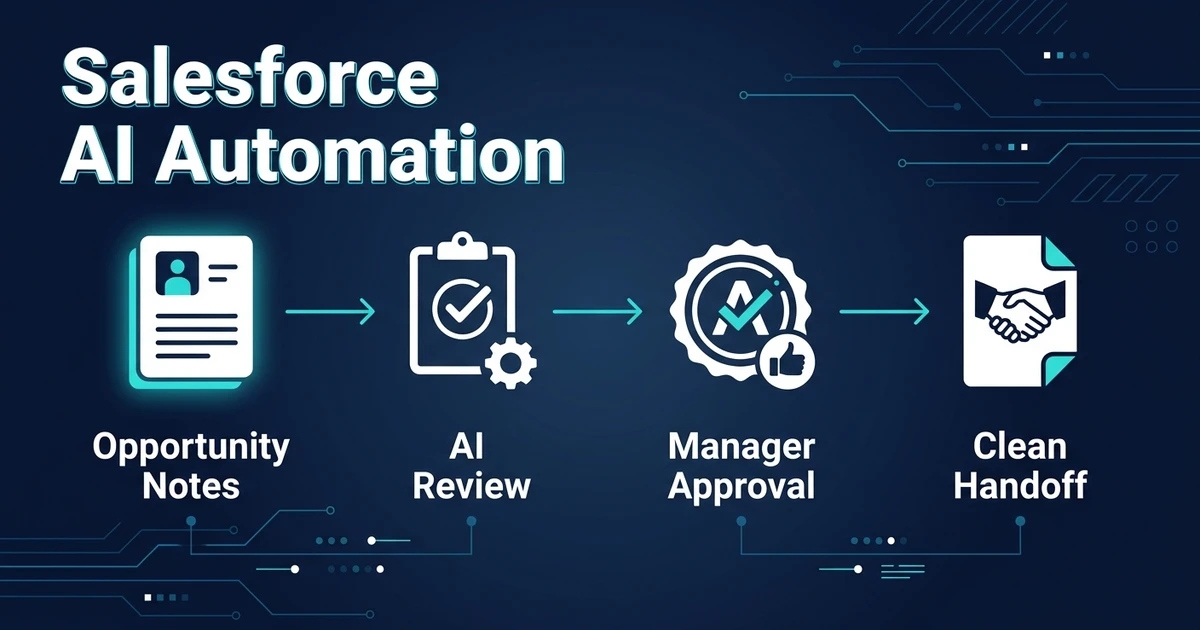
Quick Answer: Salesforce AI automation should help you keep leads, accounts, contacts, opportunities, activities, fields, approvals, and handoffs cleaner inside Salesforce. The safest workflows let AI prepare updates, flag missing context, and route exceptions before forecast-sensitive records change.
Salesforce AI automation is different from simple task automation. Salesforce teams usually have more objects, more custom fields, more approval paths, and more risk tied to opportunity data.
That means the goal is not to automate everything. The goal is to remove repetitive admin around leads, opportunities, activities, and handoffs while protecting forecast quality, customer commitments, and data governance.
Automiq AI builds these workflows as a done-for-you implementation layer. We connect the CRM to email, calendar, meeting notes, forms, and internal processes so your team gets cleaner records without building the system themselves.
Why Salesforce AI Automation Breaks Without Clean Process Rules
AI needs rules. Without them, automation becomes another source of CRM mess.
The common problem is not that Salesforce lacks data. It is that opportunity data becomes inconsistent because every rep updates fields differently. Some update Next Step. Some leave activity context in email. Some move Stage without the notes, competitors, close date, or risk context operations needs.
McKinsey reported that 23% of surveyed organizations are already scaling agentic AI somewhere in the enterprise, while 39% are experimenting with AI agents in its 2025 State of AI research. That shift makes process design more important, not less.
If an AI workflow updates the wrong field, sales leadership loses trust. If it prepares the update and asks for approval, it saves time while keeping accountability clear.
Which Salesforce Updates Should AI Handle First?
Start with updates that are high-volume and low-risk. AI is strong at extracting context from messy inputs and turning it into structured notes, tasks, and alerts.
Good first Salesforce workflows include:
- Summarizing discovery calls into opportunity notes
- Detecting missing Next Step, Close Date, Amount, or decision-maker context
- Creating follow-up tasks after meetings or email replies
- Flagging stale opportunities by stage, activity age, or missing next action
- Preparing sales-to-delivery handoff summaries from opportunity history
- Notifying owners when required or custom fields are incomplete
- Preparing Flow-ready updates that a manager can approve before they write to the record
The workflow should treat forecast-impacting fields differently. AI may suggest a Stage change, Close Date update, Amount change, or probability adjustment, but the sales owner or manager should approve it.
That is the difference between useful automation and a CRM nobody trusts.
How to Use AI Without Damaging Salesforce Forecast Quality
Forecast quality depends on consistent data. AI can support that consistency by checking for missing information after key sales events.
For example, after a call, AI can read the transcript or notes and identify decision-maker, pain point, budget signal, next step, close date risk, and buying committee context. If one of those fields is missing, the workflow can prompt the rep before the opportunity moves forward.
This supports the broader principles in our AI CRM automation guide, but the implementation should be stricter for larger sales processes. More records and more stakeholders mean more chances for bad automation to create noise.
A strong workflow does three things:
- Captures context automatically
- Shows the user what it plans to update
- Keeps an audit trail for exceptions
How Salesforce Flow, Approval Logic, and AI Should Work Together
Salesforce already gives teams structured automation paths through Flow, validation rules, required fields, task creation, and approval processes. AI should not bypass that operating model. It should prepare cleaner inputs for it.
A practical setup might let AI summarize a meeting, detect missing fields, draft the proposed field updates, and send the update to a review queue. Once approved, Salesforce Flow can handle the structured action: update the opportunity, create tasks, notify the owner, or trigger the next handoff step.
That keeps Salesforce as the system of record. AI reads messy context and prepares the work, while Salesforce rules decide what is allowed to change.
What a Practical Sales Handoff Workflow Looks Like
Handoffs are one of the easiest places to lose customer context. Sales promises one thing. Delivery receives half the story. Then everyone spends time reconstructing the deal.
A practical workflow can compile the opportunity summary, call notes, email commitments, files, owners, timelines, and open risks into a handoff record. The salesperson reviews it, confirms accuracy, and sends it to the delivery team.
Gartner describes administrative burden as a form of seller drag and recommends diagnosing it as part of improving sales team motivation in its sales enablement guidance. Handoffs are a clear place to reduce that drag because the work is repeated and the cost of missing context is visible.
If your Salesforce opportunity updates and handoffs depend on rep memory, book a free automation discovery call. Automiq AI can map one Salesforce workflow and build the review path your team needs before automation touches important records.
The right workflow does not replace sales judgment. It removes the clerical work around that judgment.
Done-for-You vs DIY Automation vs Hiring an Admin
The right option depends on how complex the process is and how much risk bad data creates.
| Option | Best Fit | Tradeoff |
|---|---|---|
| DIY automation | Simple alerts or task rules | Internal team owns testing and maintenance |
| CRM admin hire | Ongoing system ownership | Higher fixed cost and longer ramp time |
| Done-for-you build | Clear workflow with repeated admin | Best when you need execution without adding headcount |
DIY is reasonable for simple reminders. It is less useful when the workflow crosses inboxes, meetings, Salesforce records, custom fields, approval logic, and delivery handoffs.
An internal admin can help if you need constant CRM ownership. But if the immediate goal is one working workflow, AI workflow design followed by implementation is often the faster route.
How to Evaluate Your Readiness Before You Automate
Before adding AI, check whether your process has enough structure. Automation should make the current process easier to run, not hide uncertainty behind generated text.
Ask these questions:
- Which fields actually drive decisions?
- Which updates are safe without review?
- Which updates affect forecast or customer promises?
- Who approves exceptions?
- Where does meeting and email context live today?
- What should happen when the AI is uncertain?
Deloitte found that only 34% of organizations are truly reimagining business with AI, while 37% use AI at a surface level with little or no change to existing processes in its State of AI in the Enterprise research. That is the trap to avoid.
Surface-level automation adds small features. Process-level automation removes the work that keeps slowing the team down.
Frequently Asked Questions
What does AI automation do inside a complex CRM?
Salesforce AI automation uses AI-assisted workflows around leads, accounts, contacts, opportunities, activities, custom fields, Flow, approvals, and handoffs. The best setups add review points before AI changes forecast-sensitive or customer-facing information.
Can AI update opportunity fields?
Yes, but not every field should be updated without review. AI can safely prepare summaries, identify missing data, create tasks, and suggest updates while a human approves anything that affects forecasting or commitments.
Which sales operations tasks are best for automation?
Good candidates include call summaries, missing field alerts, stale opportunity checks, next-step task creation, approval-ready field updates, and sales-to-delivery handoff prep. These tasks are repetitive and easy to verify.
Will automation make CRM data less reliable?
It can if the workflow is poorly designed. A good setup uses confidence thresholds, review queues, and exception handling so AI improves data quality instead of silently overwriting important records.
How does Automiq AI build CRM workflows?
Automiq AI maps your Salesforce process, chooses the safest automation points, connects the surrounding tools, and builds a working workflow with human review where needed. The result is cleaner Salesforce operations without a long internal build.
Build CRM Workflows That Reps Actually Trust
Sales teams will not trust automation that changes important records without context. They will trust a workflow that saves time, shows its work, and asks for approval when judgment matters.
Automiq AI builds that kind of Salesforce workflow inside your existing stack. Book a free automation discovery call and we will help you choose the first opportunity update or handoff process worth automating.