Quick Answer: A complex workflow needs a recovery path as much as a trigger. Keep your current automation if failures are visible and reversible, choose another orchestration tool when branching or monitoring is the gap, and build a custom integration layer when shared business rules, approvals, and data integrity need stronger ownership.
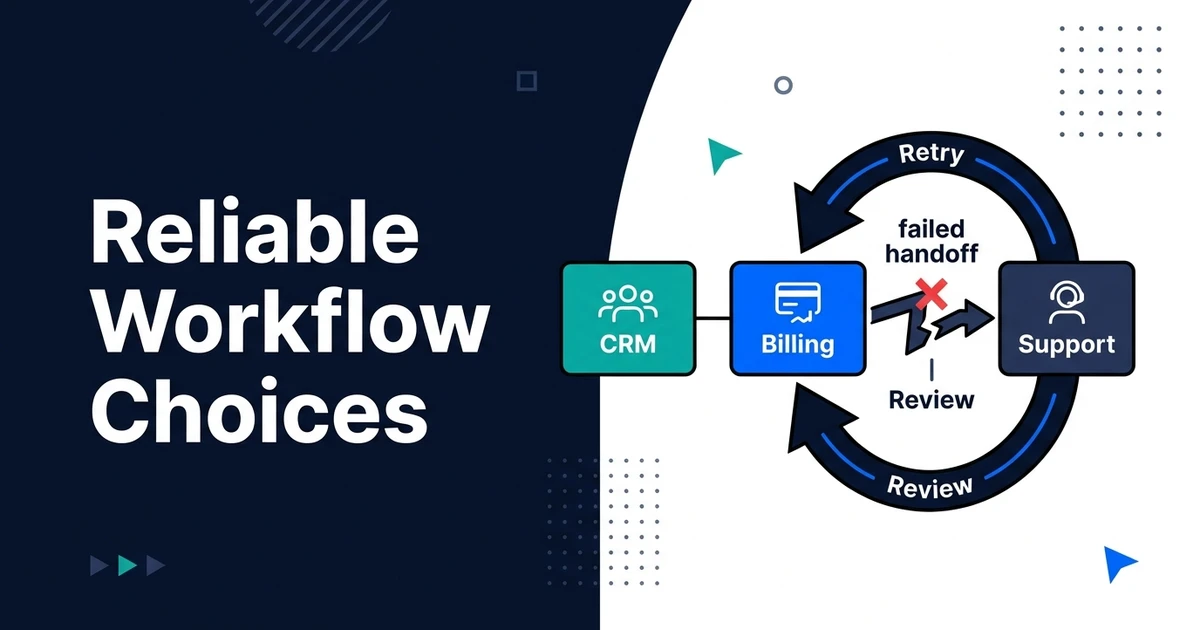
Imagine this failure: a sale closes in your CRM, billing never receives the account, and support creates a workspace anyway. By the time someone spots the mismatch, a customer is asking why their invoice and access do not agree.
That is the problem behind Zapier alternatives for complex workflows. Automiq AI would trace the failed business handoff before recommending a tool. A switch helps only when it fixes the failure mode your team actually sees.
What Happens When a Critical Workflow Fails After the Trigger?
A successful trigger proves only that the workflow started. It does not prove every downstream system reached the same business state. An automation can update a CRM field while the billing call times out. A retry can then create a duplicate account. A later support step may succeed against the wrong customer ID.
This is why “more steps” is not the definition of complexity. The difficult part is handling exceptions across systems that have different owners, data models, and failure behavior. If your process affects access, billing, or customer promises, you need a way to see and repair partial completion.
Forrester’s 2025 digital process automation landscape says automation products can address basic and sophisticated requirements and integrate diverse endpoints, while vendors differ by use case and offering. That supports a criteria-based comparison. It does not say every complex workflow needs custom code.
Where Did the Record Go: Trace One Failed Handoff
Use one illustrative event. A sales rep marks a deal won. The workflow receives the event, looks up a customer, creates a billing account, opens a support workspace, and posts a confirmation back to the CRM. The billing request times out after the account was created. The workflow retries without checking the original result and creates a second account.

Map the state at each point, not just the automation steps:
| Checkpoint | What should be true | What the operator needs to see |
|---|---|---|
| CRM event | One stable sale identifier exists | Source record and event time |
| Billing | One account matches the sale | Destination ID and response status |
| Support | Workspace points to that same customer | Linked account and access owner |
| Reconciliation | All systems agree or show an exception | Repair action and named owner |
The useful question is not “which tool has more integrations?” It is “where did this event stop, what already happened, and how do we replay it without making the state worse?” If no one can answer that from logs and records, a feature comparison is premature.
This trace should become an acceptance test. Simulate the timeout after a successful write, then require the workflow to find the existing billing account instead of creating another. Repeat with a missing CRM field and a revoked destination credential. The behavior you need is visible recovery, not an impressive diagram.
Which Workflow Automation Alternative Fixes the Failure Mode?
There are three routes. Choose by the level of control the process needs and the skills your team can maintain.
| Route | Good fit | Remaining obligation |
|---|---|---|
| Repair the existing automation | Steps are simple and the tool can expose failures and retries | Define source-of-truth rules and alert ownership |
| Move to an orchestration platform | Branching, long-running work, and visibility are the missing capabilities | Migrate credentials, event history, and operator knowledge |
| Build a custom integration service | Shared rules, approvals, and reconciliation are central to the business | Own code, deployments, monitoring, and on-call response |
Make and n8n are named orchestration candidates to test. Make documents incomplete executions and a retry error handler; n8n documents retrying failed executions. Zapier itself documents error handling and replay options, so the decision is whether your current setup can meet the recovery contract for this process. Simulate the same timeout and duplicate event in each trial before migrating.
The first route may be enough. Add a stable event ID, validation, and a failure inbox. The second route makes sense when the current configuration cannot express the branching and recovery steps cleanly. The third route earns its maintenance cost only when the workflow itself has become an operating system your business must control.
McKinsey’s 2025 AI survey found that workflow redesign had the largest effect on reported EBIT impact among 25 attributes it studied, while 21% of respondents reporting gen AI use said their organizations had redesigned at least some workflows. This finding concerns AI-enabled workflows, not a head-to-head test of automation platforms. It reinforces why the business process should be redesigned before its steps are copied into a new tool.
What Should the Recovery Contract Require?
Write down what must happen when a step fails. A workflow is business-ready when an operator can tell whether an action occurred, whether retry is safe, and who is responsible for repair.
- Stable event ID: The same sale keeps one identifier across retries and systems.
- Idempotent action: Repeating a request does not create a second billing account.
- Retry policy: Temporary failures retry within a known window; permanent failures stop and alert.
- Failure inbox: An operator sees the business record, failed step, and next safe action.
- Approval point: High-impact changes wait for an authorized person when needed.
- Reconciliation: A scheduled check catches records that are inconsistent even if no alert fired.
- Replay and rollback: The team can resume or reverse work without corrupting related records.
These are test conditions, not architectural fashion. A simple form-to-CRM transfer may need only validation and an error alert. A billing and access workflow needs stronger guarantees because a partial update can affect revenue and customer trust.
If you are unsure where the current handoff fails, book a workflow reliability scoping call. Bring one failed event and the records it touched. The outcome should be a repair plan or a justified tool or custom-build decision.
When Should You Keep and Repair the Current Automation?
Keep it if failures are rare, visible, and reversible, and the present tool can express the required validation, alerts, and retries. Tool migration introduces its own risk: new credentials, changed field mappings, and unfamiliar failure behavior. Do not trade a known defect for an untested one.
Keep it if the root cause is messy source data. If sales reps use inconsistent account names, every platform will struggle to match the customer. Define a stable ID and ownership rule first. Likewise, if no one knows who should approve an exception, a workflow engine cannot make the business decision for you.
Before signing a migration scope, run a repair trial on one flow. Capture the current failure rate from your own logs, add a validation step, route exceptions to a named person, and observe whether the mismatch stops. If the same event still produces two customer records or an invisible failure, you have evidence for a more capable orchestration path. If the repair works, keep the known system and document the fix.
The trial should include the support team. Ask them to find a failed event without calling the builder. If they can identify the affected customer, see which downstream actions occurred, and send the record for safe replay, the workflow may already be operable. If they have to compare three dashboards by hand, improve the exception view before expanding automation.
For a basic process, a configured tool and a named operator can be the best answer. Workflow automation services become valuable when the service includes the exception path and ownership, not merely a new set of steps.
Who Monitors and Owns the Workflow After Launch?
An in-house team can own a critical integration if it has capacity for incidents and changes. A tool-specific consultant can improve a bounded configuration. For a freelancer-led connector, name the owner of the data contract. For a larger development team, ask who will debug a mismatch after the project ends.
A senior engineering partner should map the business state, test failures, monitor the workflow, and hand over a runbook. Automiq AI’s AI workflow automation engineering can cover the existing tools or a custom integration layer. AI and data integration across business systems becomes relevant when the workflow also has AI decisions or proprietary data sources.
Make alert ownership explicit. A technical alert without a business repair owner leaves the customer record broken. A business inbox without a technical owner leaves recurring failures unsolved. The handover should name both roles and show them how to replay an event safely.
Ask for a runbook written around business outcomes. It should state how to pause the workflow, check whether billing or support has already been updated, fix a bad mapping, replay one event, and confirm that the CRM reflects the final state. The person on duty should be able to follow it without access to the original builder’s private notes.
Also define what changes require review. A new CRM field, a billing API update, or a changed approval policy can alter the process even when the automation still shows as enabled. Assign a change owner and rerun the failure tests after each material update. That is cheaper than discovering a drifted mapping from a customer complaint.
Frequently Asked Questions
What are the main alternatives for complex workflows?
Repair the current automation, use another orchestration product, or build a custom integration service. Compare the recovery behavior you need, not only app counts or subscription features. The smallest option that passes your failure tests is usually the right one.
When does a complex workflow need custom code?
Custom code is useful when shared business rules, controlled retries, reconciliation, or approvals cannot be maintained clearly in tool configuration. First prove that the current tool cannot meet the recovery contract. Simple transfers rarely justify a custom service.
Will switching automation tools fix missing CRM records?
Only if the tool caused the missing record. Trace trigger, mapping, destination response, retries, and alerts for a real case. A stale field or ambiguous account match can survive any tool switch.
How do we stop workflow retries from creating duplicates?
Use a stable event identifier and check whether the destination action was already applied. Test a timeout that occurs after a successful write. Add reconciliation so operators can find and correct exceptions.
Who should receive workflow failure alerts?
The business owner who can repair the record needs the alert, with a technical owner for repeated failures. Include the event, current state, failed step, and safe next action. An alert without an owner is only another unread notification.
Conclusion: Buy or Build Around the Failure Path
The best workflow tool is the one your team can operate when a step fails halfway through. Trace a real exception, define the recovery contract, and keep the current setup if it passes. Change platforms or build custom only when the failure path requires it.
Keep a copy of the test event and the expected final state. When a connector, field mapping, or approval policy changes, rerun that case before relying on the workflow again. That small habit gives your team a concrete definition of working, even as the systems around it change.
Book a workflow reliability review using one broken handoff. Automiq AI can turn it into a keep, replace, or custom recommendation with acceptance tests for both success and recovery.